> ## Documentation Index
> Fetch the complete documentation index at: https://rasa.com/docs/llms.txt
> Use this file to discover all available pages before exploring further.
# Voice Assistants
> If you started building your assistant with the Rasa Developer Edition
**Developer Edition**
If you started building your assistant with [the Rasa **Developer Edition**](/docs/pro/intro#who-rasa-is-for)
before Rasa Pro 3.11 and want to try voice features, please request a new license. Licenses issued
before this version don't contain the necessary feature scopes to run voice assistants.
## Building Voice Assistants
Voice assistants provide a natural and intuitive way to interact with digital devices and services. They are particularly useful for hands-free operation, accessibility, and multitasking. They
also offer a familiar and frictionless experience to the customers
of contact centers. At the same time, voice solutions present
distinct technical challenges and require elaborate user experience
design.
Rasa provides voice channel connectors that require specialized handling
to address nuanced complexities in voice conversations. The connectors
are described in detail below.
### Voice Ready
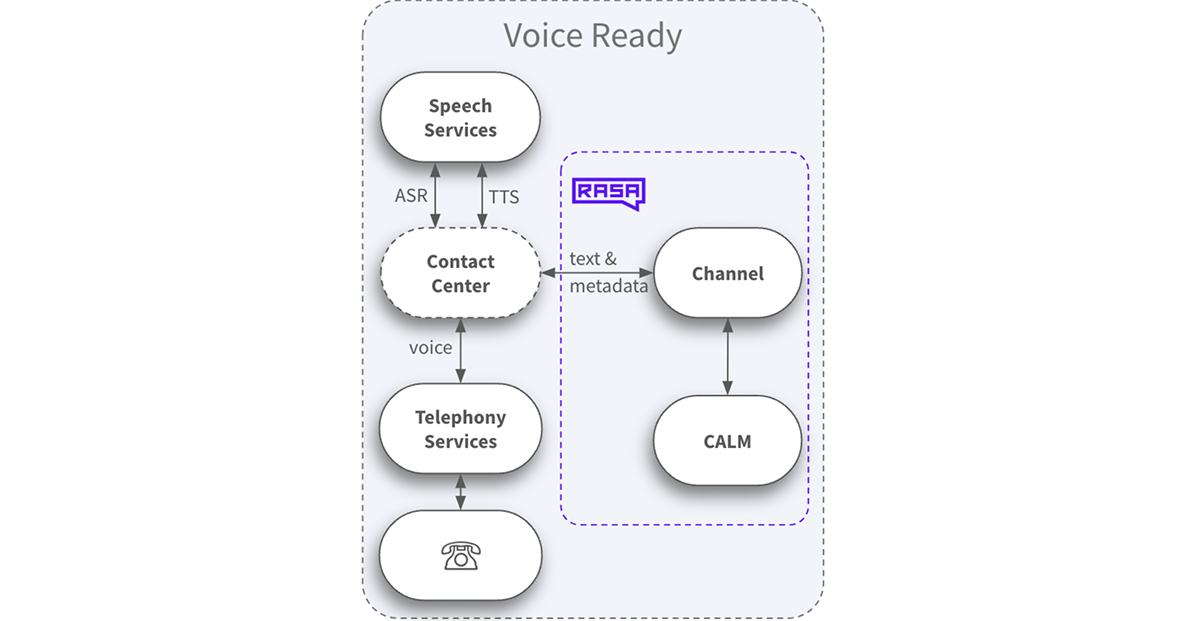 Voice Ready Channel Connectors in Rasa process input and output as text while enabling communication through audio. Rasa relies on external services for Speech Recognition (STT) and Text-to-Speech (TTS) to facilitate this.
For example, the [Twilio Voice](/docs/reference/channels/twilio-voice) built-in channel in Rasa is a Voice Ready Channel Connector.
### Voice Stream
Voice Ready Channel Connectors in Rasa process input and output as text while enabling communication through audio. Rasa relies on external services for Speech Recognition (STT) and Text-to-Speech (TTS) to facilitate this.
For example, the [Twilio Voice](/docs/reference/channels/twilio-voice) built-in channel in Rasa is a Voice Ready Channel Connector.
### Voice Stream
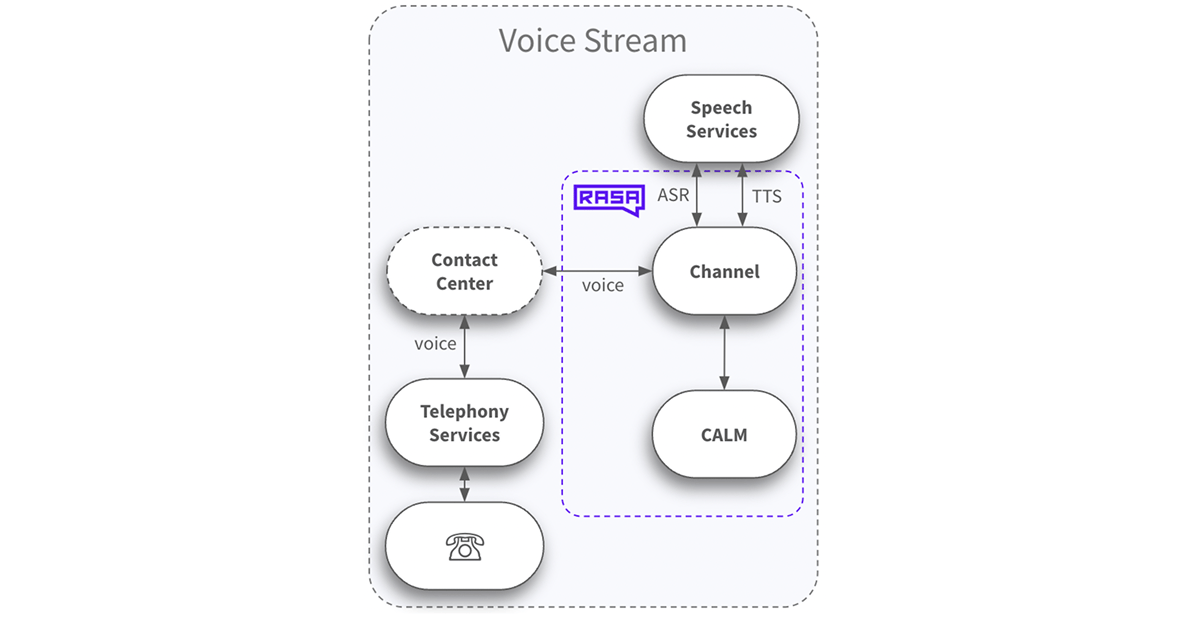 Voice Stream Channel Connectors in Rasa process both input and output in audio. They transcribe incoming audio into text, process it within Rasa, and then convert the response back into audio. The assistant is communicating with the user through Audio, just as well.
For example, the [Twilio Media Streams](/docs/reference/channels/twilio-media-streams) channel connector in Rasa is a Voice Stream Channel Connector.
## How to Start Building a Voice Assistant
To build an optimized voice assistant, it is recommended to develop it separately from text-based assistants. Although a text assistant can serve as a foundation, maintaining and evolving the assistant is easier when voice and text assistants are developed separately.
Following CDD best practices, start your voice project with rigorous user research and include iterative user tests in the development process. Make sure to design your voice flows with the unique requirements of the modality in mind.
Apart from connecting and configuring your channel connector, you will need to configure the speech services. More information on those here:
* [Speech Integrations](/docs/reference/integrations/speech-integrations) for connecting to Speech Recognition and Text to Speech Services
* Voice connectors:
* [Audiocodes VoiceAI Connect](/docs/reference/channels/audiocodes-voiceai-connect) Channel connector (Voice Ready)
* [Audiocodes Voice Stream](/docs/reference/channels/audiocodes-stream) Channel connector (Voice Stream)
* [Jambonz](/docs/reference/channels/jambonz) Channel connector (Voice Ready)
* [Twilio Voice](/docs/reference/channels/twilio-voice) Channel connector (Voice Ready)
* [Twilio Media Streams](/docs/reference/channels/twilio-media-streams) Channel connector (Voice Stream)
* [Genesys Cloud](/docs/reference/channels/genesys-cloud-voice) Channel connector (Voice Stream)
You can also [Test your voice assistant](/docs/pro/testing/trying-assistant) directly in your browser, allowing for an iterative building process.
## Voice-Specific Primitives and Conversation Repair
Voice assistants rely on the same core building blocks as text-based assistants (like responses, actions, and flows), but they require **additional configuration and design adjustments** to handle the nuances of spoken interactions.
These include:
* Fine-tuning how conversations are initiated and ended
* Managing voice-specific metadata
* Handling silence or no-input cases
* Repeating or rephrasing messages when users don’t respond
These tweaks ensure voice conversations feel natural and responsive, even when user behavior is unpredictable.
👉 [Explore voice conversation patterns](/docs/reference/primitives/patterns#common-voice-specific-pattern-modifications)
### Handling User Silence
In voice conversations, silence can signal confusion, hesitation, or distraction. With the **silence timeout** setting, you can control how long the assistant waits before responding — and tweak what it does when that happens.
👉 [How to configure user silence parameters](/docs/reference/config/overview#silence-timeout-handling)
### Collecting Input via DTMF (Keypad)
For voice assistants, you can collect user input through DTMF (Dual-Tone Multi-Frequency) signals — the tones generated when users press keys on their phone keypad. This is particularly useful for:
* **High-accuracy input**: Account numbers, PINs, or numeric codes where speech recognition errors could be problematic
* **PCI DSS compliance**: Securely collecting sensitive information like credit card numbers or passwords
* **Accessibility**: Providing an alternative input method for users who prefer or need keypad entry
DTMF input can be configured on individual `collect` steps in your flows, allowing you to specify:
* Fixed-length input (auto-submit after a specific number of digits)
* Variable-length input (user presses a termination key like `#` to submit)
* Whether to allow voice input alongside keypad input
👉 [How to configure DTMF input in collect steps](/docs/reference/primitives/flow-steps#requesting-dtmf-input)
### Using Channel-Specific Responses
Tailor your responses for voice channels like phone calls using channel-specific response variations.
👉 [How to configure channel-specific responses](/docs/reference/primitives/responses#channel-specific-response-variations)
### Multilingual Voice Assistants
If your assistant needs to support users in more than one language, you can configure both your assistant and speech services accordingly.
Define a primary language and any additional languages in your assistant configuration, then use supported speech integrations with language-specific settings for speech recognition and text-to-speech.
All of our speech integrations support `language_map`, which maps the languages defined in your assistant to provider-specific language, model, or voice settings.
👉 [Enabling multiple languages in your voice assistant](/docs/reference/integrations/speech-integrations)
👉 [How to design multilingual agents](/docs/pro/build/translating-your-assistant)
### Using Filler Responses for Slow Operations
When certain operations may take time (such as certain custom actions), include "filler" responses to keep users informed about the ongoing process. These responses confirm that the system is processing the request, reducing user uncertainty and abandonment. This technique is especially important for voice-based channels like phone calls, where users don't have visual UI indicators of progress.
This is an example of a filler response:
```yaml title="flows.yml" theme={null}
flows:
check_balance:
name: check your balance
description: check the user's account balance
steps:
- action: utter_please_wait # a response that tells user to wait a moment
- action: check_balance # let's say if this is a slow custom action
- action: utter_current_balance
```
ReAct sub-agents can produce **filler** bot audio on voice streams while tools run. The platform applies a **longer** minimum pause after that audio before the next message so the caller hears a clearer break. See [Minimum pacing between bot messages (voice streams)](/docs/reference/config/overview#minimum-pacing-between-bot-messages-voice-streams).
### Managing Interruptions (Barge-Ins)
In voice conversations, users may interrupt the assistant while it's speaking — a natural behavior that your assistant should handle gracefully. This behaviour is also called Barge-In. Interruption handling is available for Voice Stream Channels (Browser Audio, Twilio Media Streams, and Jambonz Stream) and uses partial transcripts from the ASR engine to detect when a user is speaking over the bot.
When the interrupted response comes from a **streaming custom action**, Rasa Pro also cancels the in-flight action stream: TTS stops immediately, already-delivered chunks are recorded in the tracker without being replayed, and events returned by the action are still applied. See [Interruptions during streaming custom actions](/docs/reference/primitives/patterns#interruptions-during-streaming-custom-actions).
👉 [How to configure interruption handling](/docs/reference/primitives/patterns#interruption-handling)
Voice Stream Channel Connectors in Rasa process both input and output in audio. They transcribe incoming audio into text, process it within Rasa, and then convert the response back into audio. The assistant is communicating with the user through Audio, just as well.
For example, the [Twilio Media Streams](/docs/reference/channels/twilio-media-streams) channel connector in Rasa is a Voice Stream Channel Connector.
## How to Start Building a Voice Assistant
To build an optimized voice assistant, it is recommended to develop it separately from text-based assistants. Although a text assistant can serve as a foundation, maintaining and evolving the assistant is easier when voice and text assistants are developed separately.
Following CDD best practices, start your voice project with rigorous user research and include iterative user tests in the development process. Make sure to design your voice flows with the unique requirements of the modality in mind.
Apart from connecting and configuring your channel connector, you will need to configure the speech services. More information on those here:
* [Speech Integrations](/docs/reference/integrations/speech-integrations) for connecting to Speech Recognition and Text to Speech Services
* Voice connectors:
* [Audiocodes VoiceAI Connect](/docs/reference/channels/audiocodes-voiceai-connect) Channel connector (Voice Ready)
* [Audiocodes Voice Stream](/docs/reference/channels/audiocodes-stream) Channel connector (Voice Stream)
* [Jambonz](/docs/reference/channels/jambonz) Channel connector (Voice Ready)
* [Twilio Voice](/docs/reference/channels/twilio-voice) Channel connector (Voice Ready)
* [Twilio Media Streams](/docs/reference/channels/twilio-media-streams) Channel connector (Voice Stream)
* [Genesys Cloud](/docs/reference/channels/genesys-cloud-voice) Channel connector (Voice Stream)
You can also [Test your voice assistant](/docs/pro/testing/trying-assistant) directly in your browser, allowing for an iterative building process.
## Voice-Specific Primitives and Conversation Repair
Voice assistants rely on the same core building blocks as text-based assistants (like responses, actions, and flows), but they require **additional configuration and design adjustments** to handle the nuances of spoken interactions.
These include:
* Fine-tuning how conversations are initiated and ended
* Managing voice-specific metadata
* Handling silence or no-input cases
* Repeating or rephrasing messages when users don’t respond
These tweaks ensure voice conversations feel natural and responsive, even when user behavior is unpredictable.
👉 [Explore voice conversation patterns](/docs/reference/primitives/patterns#common-voice-specific-pattern-modifications)
### Handling User Silence
In voice conversations, silence can signal confusion, hesitation, or distraction. With the **silence timeout** setting, you can control how long the assistant waits before responding — and tweak what it does when that happens.
👉 [How to configure user silence parameters](/docs/reference/config/overview#silence-timeout-handling)
### Collecting Input via DTMF (Keypad)
For voice assistants, you can collect user input through DTMF (Dual-Tone Multi-Frequency) signals — the tones generated when users press keys on their phone keypad. This is particularly useful for:
* **High-accuracy input**: Account numbers, PINs, or numeric codes where speech recognition errors could be problematic
* **PCI DSS compliance**: Securely collecting sensitive information like credit card numbers or passwords
* **Accessibility**: Providing an alternative input method for users who prefer or need keypad entry
DTMF input can be configured on individual `collect` steps in your flows, allowing you to specify:
* Fixed-length input (auto-submit after a specific number of digits)
* Variable-length input (user presses a termination key like `#` to submit)
* Whether to allow voice input alongside keypad input
👉 [How to configure DTMF input in collect steps](/docs/reference/primitives/flow-steps#requesting-dtmf-input)
### Using Channel-Specific Responses
Tailor your responses for voice channels like phone calls using channel-specific response variations.
👉 [How to configure channel-specific responses](/docs/reference/primitives/responses#channel-specific-response-variations)
### Multilingual Voice Assistants
If your assistant needs to support users in more than one language, you can configure both your assistant and speech services accordingly.
Define a primary language and any additional languages in your assistant configuration, then use supported speech integrations with language-specific settings for speech recognition and text-to-speech.
All of our speech integrations support `language_map`, which maps the languages defined in your assistant to provider-specific language, model, or voice settings.
👉 [Enabling multiple languages in your voice assistant](/docs/reference/integrations/speech-integrations)
👉 [How to design multilingual agents](/docs/pro/build/translating-your-assistant)
### Using Filler Responses for Slow Operations
When certain operations may take time (such as certain custom actions), include "filler" responses to keep users informed about the ongoing process. These responses confirm that the system is processing the request, reducing user uncertainty and abandonment. This technique is especially important for voice-based channels like phone calls, where users don't have visual UI indicators of progress.
This is an example of a filler response:
```yaml title="flows.yml" theme={null}
flows:
check_balance:
name: check your balance
description: check the user's account balance
steps:
- action: utter_please_wait # a response that tells user to wait a moment
- action: check_balance # let's say if this is a slow custom action
- action: utter_current_balance
```
ReAct sub-agents can produce **filler** bot audio on voice streams while tools run. The platform applies a **longer** minimum pause after that audio before the next message so the caller hears a clearer break. See [Minimum pacing between bot messages (voice streams)](/docs/reference/config/overview#minimum-pacing-between-bot-messages-voice-streams).
### Managing Interruptions (Barge-Ins)
In voice conversations, users may interrupt the assistant while it's speaking — a natural behavior that your assistant should handle gracefully. This behaviour is also called Barge-In. Interruption handling is available for Voice Stream Channels (Browser Audio, Twilio Media Streams, and Jambonz Stream) and uses partial transcripts from the ASR engine to detect when a user is speaking over the bot.
When the interrupted response comes from a **streaming custom action**, Rasa Pro also cancels the in-flight action stream: TTS stops immediately, already-delivered chunks are recorded in the tracker without being replayed, and events returned by the action are still applied. See [Interruptions during streaming custom actions](/docs/reference/primitives/patterns#interruptions-during-streaming-custom-actions).
👉 [How to configure interruption handling](/docs/reference/primitives/patterns#interruption-handling)