> ## Documentation Index
> Fetch the complete documentation index at: https://rasa.com/docs/llms.txt
> Use this file to discover all available pages before exploring further.
# Enterprise Search Policy
> The Enterprise Search Policy is part of Rasa's new
**New in 3.7**
The *Enterprise Search Policy* is part of Rasa's new
[Conversational AI with Language Models (CALM)](/docs/learn/concepts/calm) approach and available starting
with version `3.7.0`.
The Enterprise Search Policy lets you enhance your Rasa assistant with advanced knowledge base search.
It can deliver either direct, extractive answers from your QnA dataset, or generate rich, contextual responses using
LLM-based Retrieval-Augmented Generation (RAG).
This enables your bot to answer user questions grounded in your documentation or curated knowledge base.
The Enterprise Search component can be configured to use a local vector index like [Faiss](https://engineering.fb.com/2017/03/29/data-infrastructure/faiss-a-library-for-efficient-similarity-search/) or
connect to instances of [Milvus](https://github.com/milvus-io/milvus/) or [Qdrant](https://qdrant.tech/) vector stores.
This policy also adds the [default action `action_trigger_search`](/docs/reference/primitives/default-actions#action_trigger_search),
which can be used anywhere within a flow to trigger Enterprise Search Policy.
## How to Use Enterprise Search in Your Assistant
**Note for Rasa Pro version 3.13.0 and above**
Make sure to use the [`SearchReadyLLMCommandGenerator`](/docs/reference/config/components/llm-command-generators#searchreadyllmcommandgenerator)
in your pipeline if you rely on one of the LLM-based command generators to trigger RAG via `EnterpriseSearchPolicy`.
The `SearchReadyLLMCommandGenerator` is available starting with Rasa Pro version `3.13.0`.
### Add the policy to `config.yml`
To use Enterprise Search, add the following lines to your `config.yml` file:
```yaml title="config.yml" {3} theme={null}
policies:
# - ...
- name: rasa_plus.ml.EnterpriseSearchPolicy
# - ...
```
```yaml title="config.yml" {3} theme={null}
policies:
# - ...
- name: EnterpriseSearchPolicy
# - ...
```
### Overwrite `pattern_search`
Rasa directs all knowledge based questions to the default flow `pattern_search`. By default, it responds
with `utter_no_knowledge_base` [response](/docs/reference/primitives/responses#defining-responses) which denies the request.
This pattern can be overridden to trigger an action which in turn triggers the document search and
prompts the LLM with the relevant information.
```yaml title="flows.yml" theme={null}
flows:
pattern_search:
description: handle a knowledge-based question or request
name: pattern search
steps:
- action: action_trigger_search
```
[`action_trigger_search`](/docs/reference/primitives/default-actions#action_trigger_search) is a Rasa default action
that can be used anywhere in flows.
### Default Behavior
By default, `EnterpriseSearchPolicy` will automatically index all files with
a `.txt` extension in `/docs` directory (recursively) at the root of your project during training time and store that
index on disk.
The default embedding model used during indexing is `text-embedding-3-large`.
When the assistant loads, this document index is loaded in-memory and used for document search.
The LLM `gpt-5-mini-2025-08-07` is used by default to generate responses, which are then forwarded to the user.
## Customization
Enterprise Search Policy offers two main modes:
* [Generative Search](/docs/reference/config/policies/generative-search) (RAG): Uses a Large Language Model to generate a context-aware answer,
based on retrieved document snippets and the conversation context. This is the default mode.
* [Extractive Search](/docs/reference/config/policies/extractive-search): Returns the most relevant, pre-authored answer directly from your
dataset (QnA pairs), with no LLM generation.
Depending on the search mode you choose, different configuration parameters are available.
Please refer to the relevant sections on [Generative Search](/docs/reference/config/policies/generative-search) and
[Extractive Search](/docs/reference/config/policies/extractive-search) for more details.
In the following sections common configuration parameters are described.
### DateTime Configuration
**New in 3.15**
DateTime configuration for Enterprise Search Policy is available starting from Rasa 3.15.
By default, Enterprise Search Policy includes current date and time information in its prompts to help the model understand temporal references and provide time-aware responses.
You can configure datetime settings using the following parameters:
* **`include_date_time`** (optional, default: `true`): Enable or disable datetime information in prompts.
* **`timezone`** (optional, default: `"UTC"`): IANA timezone name (e.g., `"America/New_York"`, `"Europe/London"`, `"Asia/Tokyo"`).
When `include_date_time` is enabled, prompts automatically include a "Date & Time Context" section showing:
* Current date (formatted as "DD Month, YYYY")
* Current time (formatted as "HH:MM:SS" with timezone)
* Current day of the week
```yaml title="config.yml" theme={null}
policies:
- name: EnterpriseSearchPolicy
include_date_time: true # Defaults to true
timezone: "UTC" # Defaults to UTC if not specified
```
```yaml title="config.yml" theme={null}
policies:
- name: EnterpriseSearchPolicy
include_date_time: true
timezone: "Europe/London"
```
**Timezone Format**
The `timezone` parameter must be a valid IANA timezone name. Common examples include:
* `"UTC"`
* `"America/New_York"`
* `"America/Los_Angeles"`
* `"Europe/London"`
* `"Asia/Tokyo"`
* `"Australia/Sydney"`
If an invalid timezone is provided, Rasa will raise a `ValidationError` during policy initialization.
### Embeddings
The embeddings are used to embed the user query, which is then used to search for relevant documents in the vector store.
The embeddings model used to embed the documents in the vector store should match the one used for the user query.
The default embedding model used is `text-embedding-3-large`.
You can change the embedding model by adding the following to your `config.yml` and `endpoints.yml` files:
```yaml title="config.yml" {3} theme={null}
policies:
# - ...
- name: EnterpriseSearchPolicy
embeddings:
model_group: openai_embeddings
# - ...
```
```yaml title="endpoints.yml" theme={null}
model_groups:
- id: openai_embeddings
models:
- model: "text-embedding-3-large"
provider: "openai"
timeout: 7
```
### Vector Store
The policy supports connecting to a vector stores like [Faiss](/docs/reference/config/policies/enterprise-search-policy#faiss),
[Milvus](/docs/reference/config/policies/enterprise-search-policy#milvus) and [Qdrant](/docs/reference/config/policies/enterprise-search-policy#qdrant).
Available parameters depend on the type of vector store. When the assistant loads, Rasa connects to the
vector store and performs document search whenever the policy is invoked. The relevant documents (or more precisely,
document chunks) are used in the prompt as context for LLM to answer the user query.
**New in 3.9**
Rasa now supports [Custom Information Retrievers](/docs/reference/config/policies/custom-information-retrievers) to be used with the
Enterprise Search Policy. This feature allows you to integrate your own custom search systems or vector stores with Rasa.
#### Faiss
**FAISS is not meant for production use cases.**
Faiss is intended for testing, development, and small internal deployments only. For production workloads, use a robust external vector store like [Milvus](/docs/reference/config/policies/enterprise-search-policy#milvus) or [Qdrant](/docs/reference/config/policies/enterprise-search-policy#qdrant).
[Faiss](https://faiss.ai/index.html) stands for Facebook AI Similarity Search. It is an open source
library that enables efficient similarity search. Rasa uses an in-memory Faiss as default vector store.
With this vector store, the document embeddings are created and stored on-disk during `rasa train`. When
the assistant loads the vector store is loaded in-memory and used for retrieval of relevant documents for
the LLM prompt.
The property configuration defaults to
```yaml title="config.yml" theme={null}
policies:
- ...
- name: rasa_plus.ml.EnterpriseSearchPolicy
vector_store:
type: "faiss"
source: "./docs"
```
```yaml title="config.yml" theme={null}
policies:
- ...
- name: EnterpriseSearchPolicy
vector_store:
type: "faiss"
source: "./docs"
```
The `source` parameter specifies the path of directory containing your
documentation.
#### Milvus
**Embedding Model**
Make sure to use the same embedding model which was used to embed the
documents in the vector store. The configuration for embeddings can be found [here](/docs/reference/config/policies/enterprise-search-policy#embeddings).
This configuration should be used when connecting to a self-hosted instance of [Milvus](https://github.com/milvus-io/milvus/).
The connection assumes that the knowledge base document embeddings are available in the vector store.
```yaml title="config.yml" theme={null}
policies:
- ...
- name: rasa_plus.ml.EnterpriseSearchPolicy
vector_store:
type: "milvus"
threshold: 0.7
```
```yaml title="config.yml" theme={null}
policies:
- ...
- name: EnterpriseSearchPolicy
vector_store:
type: "milvus"
threshold: 0.7
```
The property `threshold` can be used to specify a minimum similarity score threshold for the retrieved
documents. This property accepts values between 0 to 1 where 0 implies no minimum threshold.
The connection parameters should be added to the `endpoints.yml` file as follows:
```yaml title="endpoints.yml" theme={null}
vector_store:
type: milvus
host: localhost
port: 19530
collection: rasa
```
The connection parameters are used to initialize the `MilvusClient` or required for document search.
More details about them can also be found in [Milvus Documentation](https://milvus.io/api-reference/pymilvus/v2.4.x/MilvusClient/Client/MilvusClient.md).
Here's a list of all available parameters that can be used with Rasa.
| parameter name | description | default value |
| ------------------------------------------------------------- | --------------------------------------------- | ------------- |
| host | IP address of the Milvus server | `"localhost"` |
| port | Port of the Milvus server | `19530` |
| user | Username of the Milvus server | `""` |
| password | Password of the username of the Milvus server | `""` |
| collection | name of the collection | `""` |
| The parameters `host`, `port` and `collection` are mandatory. | | |
#### Qdrant
**Embedding Model**
Make sure to use the same embedding model which was used to embed the documents
in the vector store. The settings for embeddings can be found [here](/docs/reference/config/policies/enterprise-search-policy#embeddings).
Use this configuration to connect to a locally deployed or the cloud instance of [Qdrant](https://qdrant.tech/).
The connection assumes that the knowledge base document embeddings are available in the vector store.
```yaml title="config.yml" theme={null}
policies:
- ...
- name: rasa_plus.ml.EnterpriseSearchPolicy
vector_store:
type: "qdrant"
threshold: 0.5
```
```yaml title="config.yml" theme={null}
policies:
- ...
- name: EnterpriseSearchPolicy
vector_store:
type: "qdrant"
threshold: 0.5
```
The property `threshold` can be used to specify a minimum similarity score threshold for the retrieved
documents. This property accepts values between 0 to 1 where 0 implies no minimum threshold.
To connect to Qdrant, Rasa requires connection parameters which can be added to `endpoints.yml`
```yaml title="endpoints.yml" theme={null}
vector_store:
type: qdrant
collection: rasa
host: 0.0.0.0
port: 6333
content_payload_key: page_content
metadata_payload_key: metadata
```
Here are all available connection parameters. Most of these initialize the Qdrant Client
and can also be found in [Qdrant Python library documentation](https://python-client.qdrant.tech/qdrant_client.qdrant_client),
| parameter name | description | default value |
| ---------------------- | ------------------------------------------------------------------------------------------------------------------------------------------------------------------------------------------------------------- | ------------- |
| collection | name of the collection | `""` |
| host | Host name of Qdrant service. If url and host are None, set to ‘localhost’. | |
| port | Port of the REST API interface. | `6333` |
| url | either host or str of “Optional\[scheme], host, Optional\[port], Optional\[prefix]”. | |
| location | If :memory: - use in-memory Qdrant instance. If str - use it as a url parameter. If None - use default values for host and port. | |
| grpc\_port | Port of the gRPC interface. | `6334` |
| prefer\_grpc | If true - use gPRC interface whenever possible in custom methods. | `False` |
| https | If true - use HTTPS(SSL) protocol. | |
| api\_key | API key for authentication in Qdrant Cloud. | |
| prefix | If not None - add prefix to the REST URL path. Example: service/v1 will result in [http://localhost:6333/service/v1/\{qdrant-endpoint}](http://localhost:6333/service/v1/%7Bqdrant-endpoint%7D) for REST API. | None |
| timeout | Timeout in seconds for REST and gRPC API requests. | `5` |
| path | Persistence path for QdrantLocal. | |
| content\_payload\_key | The key used for content during ingestion | `"text"` |
| metadata\_payload\_key | The key used for metadata during ingestion | "metadata" |
| vector\_name | Name of the vector field in the database collection where embeddings are stored. | None |
Only the parameter `collection` is mandatory. Other connection parameters depend on the deployment option
for Qdrant. For example, when connecting to the self-hosted instance with default configuration
only `url` and `port` are mandatory.
From Qdrant, Rasa expects to read a [langchain `Document` structure](https://python.langchain.com/docs/integrations/document_loaders/copypaste)
comprising two fields:
1. content of the document is defined by the key `content_payload_key`. Default value `text`
2. metadata of the document is defined by the key `metadata_payload_key`. Default value is `metadata`
It is recommended to adjust these values in accordance with the method employed for adding documents to Qdrant.
#### Vector Store Configuration
* `vector_store.type` (Optional): This parameter specifies the type of vector store you want to use
for storing and retrieving document embeddings. Supported options include:
* "faiss" (default): [Facebook AI Similarity Search](/docs/reference/config/policies/enterprise-search-policy#faiss) library.
* "milvus": [Milvus](/docs/reference/config/policies/enterprise-search-policy#milvus) Vector Database.
* "qdrant": [Qdrant](/docs/reference/config/policies/enterprise-search-policy#qdrant) Vector Database.
* `vector_store.source` (Optional): This parameter defines the path to the directory
containing document vectors, used only with the "faiss" vector store type (default: "./docs").
* `vector_store.threshold` (Optional): This parameter sets the minimum similarity score required
for a document to be considered relevant. Used only with "Milvus" and "Qdrant" vector store
types (default: 0.0).
## Error Handling
If no relevant documents are retrieved then [*Pattern Cannot Handle*](/docs/learn/concepts/conversation-patterns) is triggered.
In case of internal errors, this policy triggers the [*Internal Error Pattern*](/docs/learn/concepts/conversation-patterns).
These errors are,
* If Vector Store fails to connect.
* If document retrieval returns an error.
* If LLM returns an empty answer or the API endpoint raises an error (including connection timeouts).
## Troubleshooting
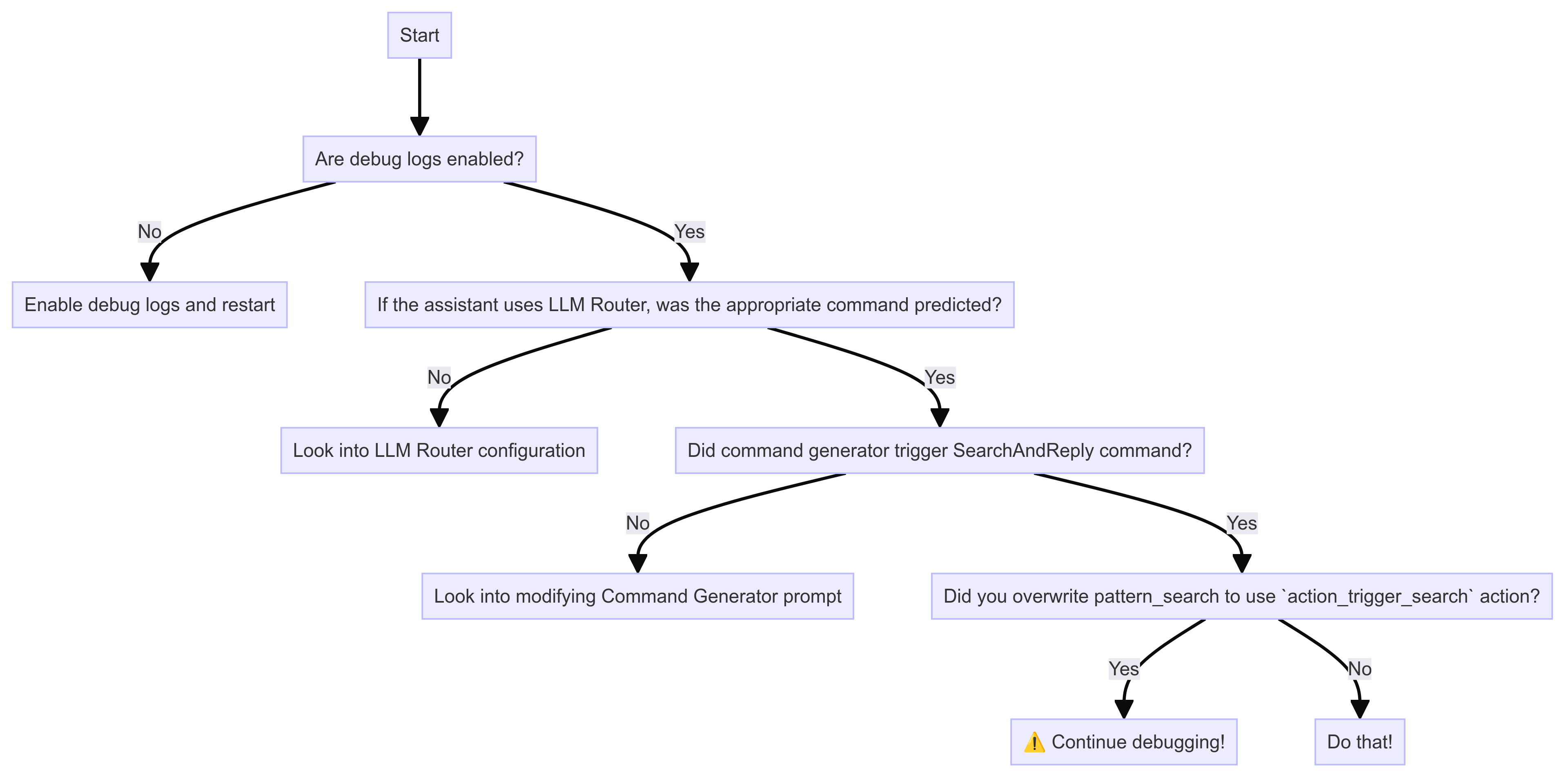
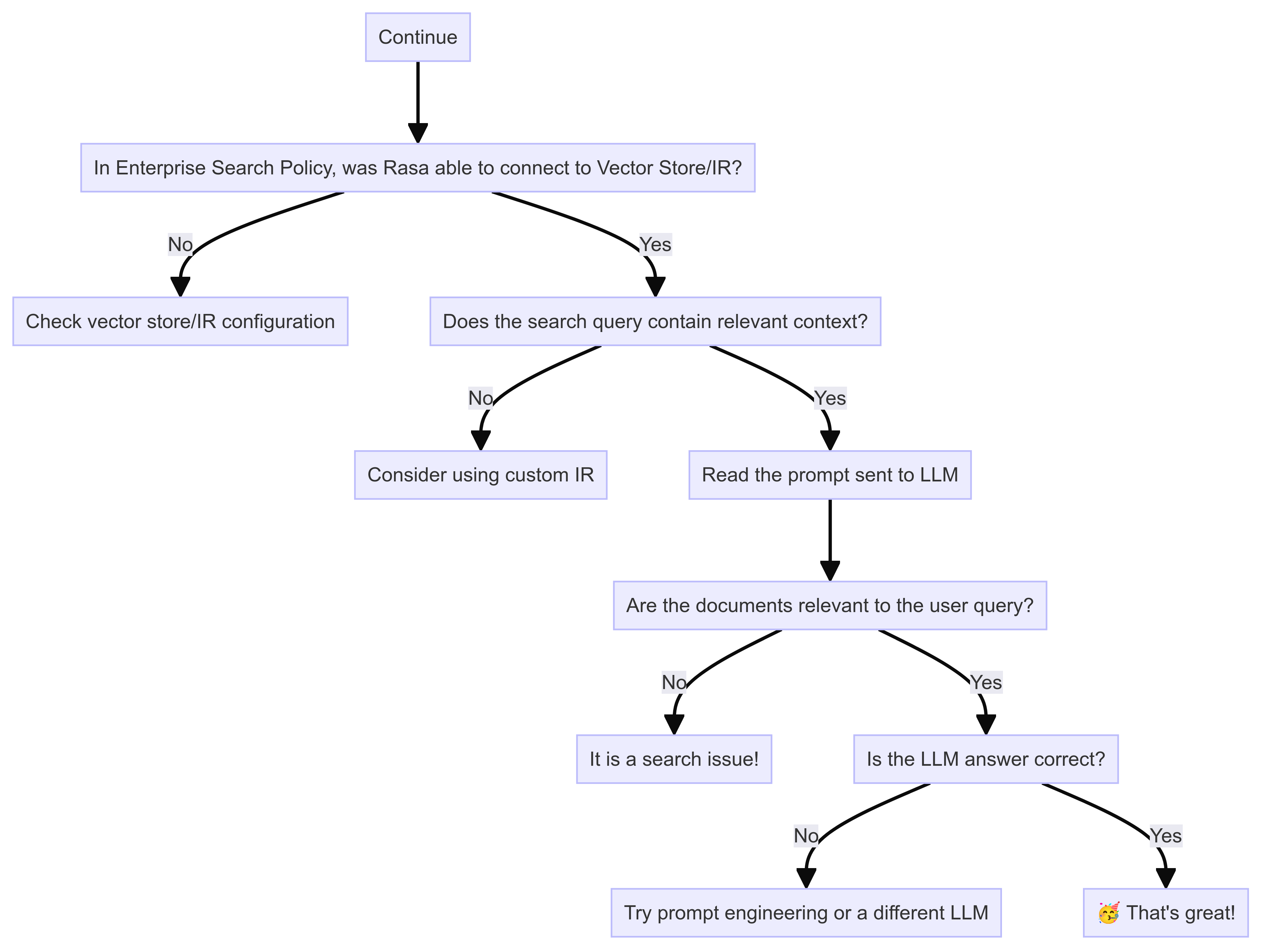
These tips should help you debug issues with Enterprise Search Policy. To isolate the issue, please
follow these debugging diagrams,
 ### Enable Debug Logs
You can control which level of logs you would like to see with `--verbose` (same as `-v`) or `--debug` (same as `-vv`)
as optional command line arguments. From Rasa Pro 3.8, you can set the following environment variables to
have a more fine-grained control over LLM prompt logging,
* `LOG_LEVEL_LLM`: Set log level for all LLM components
* `LOG_LEVEL_LLM_COMMAND_GENERATOR`: Log level for Command Generator prompt
* `LOG_LEVEL_LLM_ENTERPRISE_SEARCH`: Log level for Enterprise Search prompt
* `LOG_LEVEL_LLM_INTENTLESS_POLICY`: Log level for Intentless Policy prompt
* `LOG_LEVEL_LLM_REPHRASER`: Log level for Rephraser prompt
### Is document search working well?
Enterprise Search Policy responses relies on search performance. Rasa expects that the search returns relevant
documents or sections of documents for the query. With the debug
logs, you can read the LLM prompts to see if the document chunks in the prompt are relevant to the user query.
If they are not, then the problem is likely within the vector store or the custom information retrieval used.
You should set up evaluations to assess search performance over a set of queries.
## Related topics
- [Enterprise Search](/docs/pro/customize/enterprise-search.md)
- [Custom Information Retrieval with Enterprise Search Policy](/docs/reference/config/policies/custom-information-retrievers.md)
- [Configuring Enterprise Search (RAG)](/docs/pro/build/configuring-enterprise-search.md)
- [Generative Search](/docs/reference/config/policies/generative-search.md)
- [Extractive Search](/docs/reference/config/policies/extractive-search.md)
### Enable Debug Logs
You can control which level of logs you would like to see with `--verbose` (same as `-v`) or `--debug` (same as `-vv`)
as optional command line arguments. From Rasa Pro 3.8, you can set the following environment variables to
have a more fine-grained control over LLM prompt logging,
* `LOG_LEVEL_LLM`: Set log level for all LLM components
* `LOG_LEVEL_LLM_COMMAND_GENERATOR`: Log level for Command Generator prompt
* `LOG_LEVEL_LLM_ENTERPRISE_SEARCH`: Log level for Enterprise Search prompt
* `LOG_LEVEL_LLM_INTENTLESS_POLICY`: Log level for Intentless Policy prompt
* `LOG_LEVEL_LLM_REPHRASER`: Log level for Rephraser prompt
### Is document search working well?
Enterprise Search Policy responses relies on search performance. Rasa expects that the search returns relevant
documents or sections of documents for the query. With the debug
logs, you can read the LLM prompts to see if the document chunks in the prompt are relevant to the user query.
If they are not, then the problem is likely within the vector store or the custom information retrieval used.
You should set up evaluations to assess search performance over a set of queries.
## Related topics
- [Enterprise Search](/docs/pro/customize/enterprise-search.md)
- [Custom Information Retrieval with Enterprise Search Policy](/docs/reference/config/policies/custom-information-retrievers.md)
- [Configuring Enterprise Search (RAG)](/docs/pro/build/configuring-enterprise-search.md)
- [Generative Search](/docs/reference/config/policies/generative-search.md)
- [Extractive Search](/docs/reference/config/policies/extractive-search.md)