
Rasa 3.14 is here: the Pi release. Like 𝜋, these features are irrationally powerful, but unlike 𝜋, we'll keep this brief and dive into the newest Rasa technology.
Rasa 3.14: Autonomous steps + MCP and A2A Protocol
Autonomous steps in Flows (Beta)
The biggest challenge in conversational AI? Real conversations rarely follow a straight line. When users are exploring options, such as searching for a product, booking an appointment, or comparing alternatives, they often change their minds, ask follow-up questions, or go off track before making a decision. These exploratory interactions don’t fit neatly into a predefined process.
That’s where autonomous steps shine. They give your assistant the flexibility to handle open-ended conversations while staying grounded in your business logic.
- Use prescriptive steps in flows when you want to guide users step-by-step through a clear process.
- Call an autonomous step when you want to help them explore, discover, and make decisions naturally.
With Rasa 3.14, you can now embed these autonomous agent steps directly inside Rasa flows, combining the structure of guided processes with the openness of exploratory conversation. Moreover, you can use Rasa to orchestrate all of these agents together for a unified conversational experience. Check out the agentic orchestration repository to see a unified example of the components shown below.
Two Autonomous Step Modes
- Task-specific agents autonomously work toward filling specific slots:
flows:
  book_appointment:
    description: helps users book appointments
    steps:
      - call: ticket_agent
        exit_if:
          - slots.chosen_appointment is not null
      - collect: user_confirmation
The ticket agent explores available time slots, checks constraints, and negotiates with the user, utilizing whatever tools are necessary, until it finds an acceptable appointment. Once the exit conditions are satisfied, control returns to the flow for final confirmation. You define the goal; the agent determines how to achieve it.
- Open-ended agents determine their own completion criteria:
flows:
  stock_research:
    description: helps research and analyze stock investment options
    steps:
      - call: stock_explorer  # Runs until agent signals completion
The Stock Explorer is an autonomous step that researches stocks, analyzes news, and explores the data until the user has enough information to make a decision.
How it works
Agents operate within a managed loop orchestrated by Rasa:
- Context sharing: Agents receive full conversation history and slot values. They can set slots for downstream use.
- Conversation repair: Users can digress to other flows mid-agent (such as checking their balance while researching stocks) and then seamlessly resume where they left off.
- Smart orchestration: Automatic interruption and restart handling if users want to change previous answers.
- Robust error handling: Automatic retries on network errors, smart fallbacks for critical failures, and full logging for easier debugging.
You maintain full control over when agents run and when structured flows take over.
MCP integration (Beta)
Model Context Protocol (MCP) is an open standard for connecting AI systems to external tools and data sources. With Rasa's MCP integration, you can plug into a growing ecosystem of tools without needing to write custom integration code.
Direct tool calls in flows
Do you need a specific capability at a precise moment? Call MCP tools directly from flow steps:
flows:
  buy_order:
    steps:
      - collect: stock_name
      - collect: order_quantity
      - action: check_feasibility # Make sure purchasing price is below the users balance
        next:
          - if: slots.order_feasible is True
            then:
              - call: place_buy_order # MCP tool name
                mcp_server: trade_server # MCP server where tool is available
                mapping:
                  input:
                    - param: ticker_symbol # tool parameter name
                      slot: stock_name # slot to send as value
                    - param: quantity
                      slot: order_quantity
                  output:
                    - slot: order_status # slot to store results
                      result_key: result.structuredContent.order_status.success
Configure your MCP server once in endpoints.yml:
mcp_servers:
  - name: trade_server
    url: http://localhost:8080
    type: http
Then use its tools anywhere in your flows. No custom actions needed. Map slot values to tool parameters, extract results back to slots, done.
ReAct-Style agents with MCP tools
Combine MCP tools with autonomous steps:
# sub_agents/stock_explorer/config.yml
agent:
  name: stock_explorer
  description: "Agent that helps users research and analyze stock options"

configuration:
  llm:
    type: openai
    model: gpt-4o-0613

connections:
  mcp_servers:
    - name: trade_server
      include_tools:
        - find_symbol
        - get_company_news
        - apply_technical_analysis
        - fetch_live_price
      exclude_tools:
        - place_buy_order  # Keep sensitive operations out of agent control
In this setup, the agent will autonomously decide which tools to call, in what order, based on the conversation context. It's ReAct-style reasoning (Reason + Act), but it can be grounded in your business context and follow your rules.
Here you can see the stock_explorer agent in the context of a flow:
flows:
  stock_research:
    description: helps research and analyze stock investment options
    steps:
      - call: stock_explorer  # Runs until agent signals completion
A2A integration (Beta)
Rasa 3.14’s Agent-to-Agent (A2A) integration enables your assistant to collaborate with external, third-party agents, creating a true multi-agent ecosystem. Unlike MCP, which connects to internal tools and data, A2A protocol bridges across organizations, allowing your assistant to delegate tasks to autonomous agents in domains such as travel, retail, or automotive. Instead of just calling internal APIs, your assistant can now ‘partner’ with external agents, like a travel bot handing off hotel bookings or a car buying agent connecting users with a dealership and purchasing agents.
Configuring the External Sub-Agent Connection
Create and define your sub-agent's connection parameters in
sub_agents/car_shopping_agent/config.yml:
# Basic agent information
agent:
  name: car_shopping_agent
  protocol: a2a
  description: "Helps users shop for cars by connecting them with dealers and facilitating purchases"
# Core configuration
configuration:
  agent_card: ./sub_agents/car_shopping_agent/agent_card.json
The agent_card is a critical A2A protocol artifact that exposes the external agent's capabilities. Importantly, this can be a remote URL pointing to an external organization's agent card, allowing you to integrate with partners without hosting their agent on your own.
Once the agent is configured, you can call it in a flow the same way you would other agents.
Calling a Sub-Agent from a Flow
flows:
  car_shopping:
    name: "car shopping"
    description: Find a specific car at a local dealer, once the user knows which model they want.
    steps:
      - call: car_shopping_agent
The A2A workflow creates a seamless handoff experience: when the command generator detects intent to buy a car, it starts the car_shopping flow and connects to the external agent. That agent runs autonomously on its own infrastructure, handling the specialized conversation loop until it needs user input or completes its task.
Rasa Studio 1.14: Latency tracing and controlled slots
Trace voice stack latency
Voice applications thrive or fail based on the latency they experience. But when your stack includes ASR, Rasa, TTS, and network hops, where's the bottleneck?
Assess voice AI latency with granular metrics directly in Rasa Studio:
- Total Response Latency: End-to-end turn time
- Rasa Latency: Processing time from text to response
- ASR Latency: First partial to final transcription
- TTS First Byte: Time to start audio (200ms = instant, 2000ms = waiting)
- TTS Complete: Total audio streaming time
Pinpoint bottlenecks in your voice assistant stack instantly.

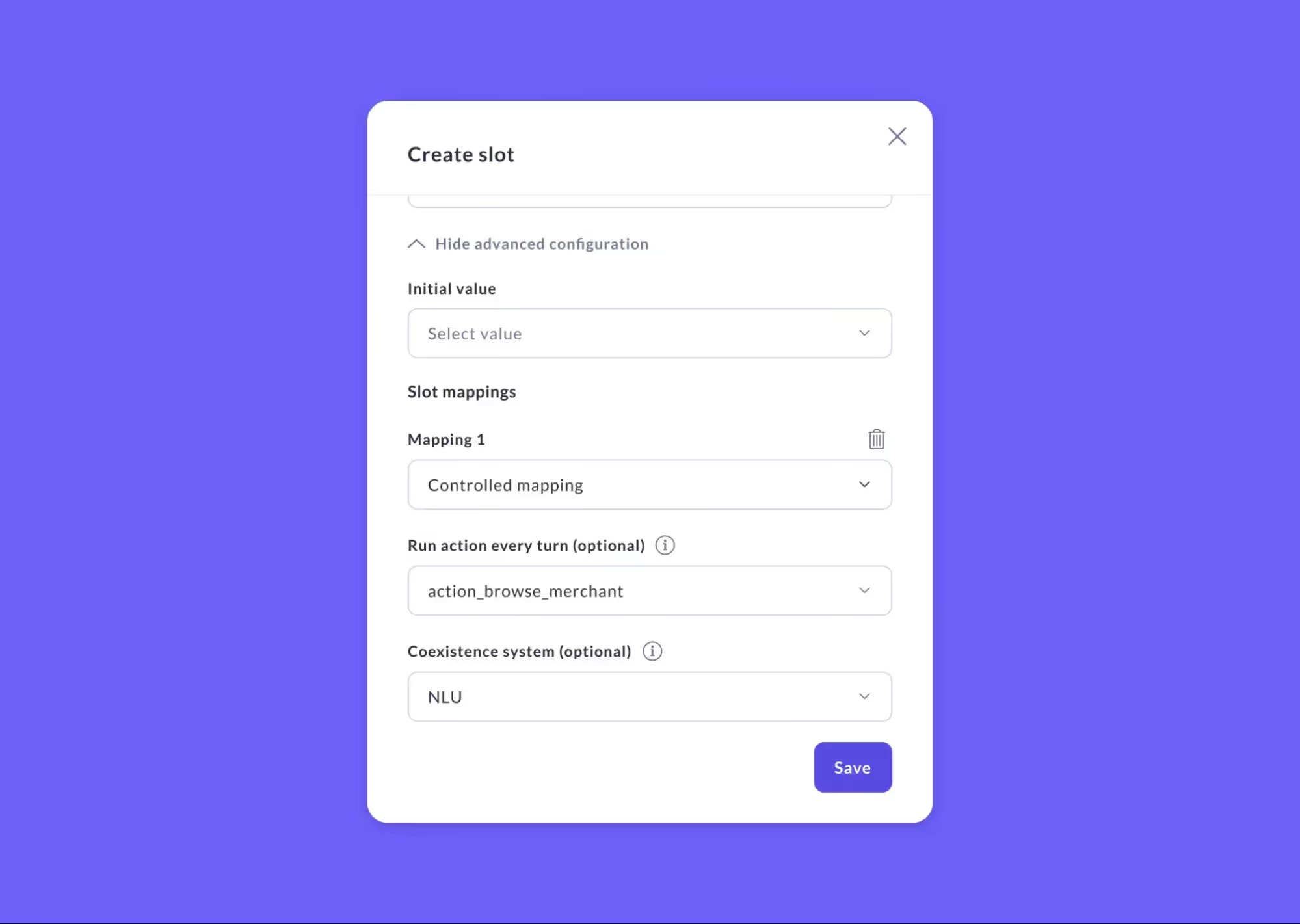
Controlled slots support
Studio now fully supports controlled slots, which are slots that can be filled by custom actions, button payloads, or set_slots flow steps, rather than by extracting direct from user input.
Use cases:
- API enrichment: Fill user_credit_score from a backend call
- Button selections: Fill chosen_plan when users click a plan button
- Computed values: Fill order_total by calculating from other slots
Voice Assistant Features: Barge-In & Silence Handling
Barge-In support
Natural conversations involve interruptions. If your bot is rambling and the user says, "Stop, I need to find out my order status first," they shouldn't have to wait.
Rasa now supports barge-in (user interrupts bot) across Browser Audio, Twilio Media Streams, Jambonz, and Studio’s “Talk to your assistant” panel. It uses partial transcription events from your ASR to detect interruptions in real-time.
Control it globally:
# credentials.yml
twilio:
  interruptions:
    enabled: true
    min_words: 3  # Filter out backchannels like "uh-huh", "hmm"
Or disable it for specific critical responses:
responses:
  utter_balance:
    - text: "Your current balance is {balance} dollars and {cents} cents."
      allow_interruptions: false  # Don't let users interrupt financial info
The min_words threshold (default: 3) prevents false positives from conversational backchannels. "Yeah" won't interrupt, but "actually I need" will.
Granular silence timeouts
Different inputs need different silence handling. Credit card numbers need patience; yes/no questions shouldn't wait forever.
Set silence timeouts globally in credentials.yml (defaults to 7 seconds for voice channels), then override per-step, per-channel:
steps:
  - collect: credit_card_number
    silence_timeout:
      twilio: 20      # Users need time to find their card
      browser: 15

  - collect: confirm_transfer
    silence_timeout:
      twilio: 5       # Yes/no shouldn't wait long
This gives you pinpoint control over conversational pacing without requiring you to rewrite channel logic.
Upgrading + Python 3.12 & 3.13 Support
Ensure that you create a fresh environment when installing Rasa 3.14. Installation has also been streamlined to increase speed, and we have added support for Python 3.12 and 3.13.
- Note: TensorFlow components require Python 3.11 or earlier. These components are not compatible with Python versions greater than 3.11.
Easier Production Deployment
Deploying Rasa to production has historically required deep infrastructure knowledge and often Rasa engineering support. We’ve worked to lighten this dependency.
Now available in our docs are comprehensive, opinionated deployment playbooks for AWS and GCP. These guides are designed for DevOps teams to deploy Rasa independently, covering:
- Infrastructure setup (VPCs, load balancers, databases)
- Scaling and security best practices
- Monitoring and CI/CD integration
AWS Deployment Playbook | GCP Deployment Playbook
Conclusion
Rasa 3.14 marks a major shift in how you build assistants.
Until now, you had to pick either:
- Flows: Predictable and controlled, but prescriptive by design.
- Agents: Flexible and natural, but hard to control.
Now you can combine both structured flows for known paths, agentic loops for open-ended exploration, with smooth transitions between them. Connect external tools without custom code, debug voice latency precisely, and deploy to production with confidence. You get flexibility where you need it, structure where it matters, and control throughout.
Learn more:
P.S. Like π, Rasa’s evolution never ends. Stay tuned for the next decimal of innovation.