How to Build a Customer Service Chatbot in 2026
Most support teams don't struggle to understand why they need an AI chatbot. They struggle to build one that actually works. The internet is full of vendor pitch pages and five-minute YouTube tutorials. What's missing is a practical, step-by-step guide to building a custom chatbot for the teams doing the actual work.
That's what this is. Whether you're an engineering lead evaluating frameworks, a product manager scoping the build, or a CX director making the build-vs-buy call, this guide covers the full picture: architecture decisions, conversation design, dialogue understanding setup, integrations, testing, deployment, and the costs nobody talks about up front.
The goal isn't to deflect tickets. It's to give customers their first meaningful action as fast as possible.
What Is a Customer Service Chatbot?
A customer service chatbot is a software program that handles customer inquiries through automated conversation, typically over text or voice. AI chatbots in this category answer FAQs, resolve common issues, look up account information, and escalate to a human agent when needed, all without requiring a person on the other end for every interaction. Modern AI chatbots can also tailor responses to customer preferences and adapt tone based on conversation context.
How AI Chatbots Work
At a basic level, an AI chatbot receives a message, interprets the user input from the customer, retrieves the relevant information, or takes an action, and responds. The interpretation and action steps are where most of the engineering effort goes.
Older rule-based systems relied on keyword matching and decision trees. You'd define a list of phrases, map them to responses, and the bot would follow a fixed script. That works well for narrow, predictable user queries. It breaks down the moment a customer phrases something unexpectedly.
Modern AI chatbots use natural language processing and speech recognition (for voice channels) to understand human language and the meaning behind customer messages, not just the words. They can handle variation in phrasing, maintain context across multiple turns, and connect to backend systems to perform actions: checking a balance, updating an address, or processing returns. Today's AI chatbots also tailor customer responses to who's asking, drawing on customer data to feel less generic.
The most capable AI chatbots today use an orchestration layer that decides what to do next based on the full state of the conversation, not just the last message. That's a meaningful architectural shift. The agent isn't reacting to keywords; it's managing a goal.
Types of AI Chatbots (Rule-Based vs. AI-Powered)
Rule-based chatbots follow predefined scripts. They're fast to build, easy to audit, and reliable for narrow use cases. The tradeoff is rigidity: they can't handle anything outside the script.
AI chatbots use machine learning and large language models to understand natural language and generate responses. They handle a wider range of inputs but require more setup, more testing, and careful guardrails for anything that touches sensitive data or business-critical actions.
Hybrid systems combine both: guided, rule-driven behavior for high-stakes paths (account changes, payment processing, identity verification) and more flexible, prompt-driven behavior for general inquiries and long-tail questions. This is where most enterprise deployments are heading.
Why Build a Custom Chatbot for Customer Service?
The honest answer is: it depends on what "building" looks like for your organization and what you expect the AI chatbot to actually do. AI chatbots aren't a universal cost-saver. But for teams with high ticket volumes, repetitive queries, and clear use cases, the case for a custom chatbot is strong.
See enterprise customer service chatbot requirements if you're working through whether this fits your organization.
Cost Efficiency and 24/7 Availability
The clearest operational win is coverage. AI chatbots handle volume at hours when human agents aren't staffed, and they handle it without a per-interaction cost at scale. Cost efficiency at this level is what makes the business case work; many enterprises see meaningful reductions in customer service costs once an effective chatbot is doing real resolution. For teams running global support or dealing with demand spikes (product launches, outages, billing cycles), that matters.
Cost efficiency isn't automatic, though. The real savings come when the AI chatbot actually resolves issues, not just acknowledges them and creates a ticket. Containment rate, the percentage of conversations fully resolved without human intervention, is the number to watch.
Faster Resolution Times and Higher Customer Satisfaction
Speed is where AI chatbot ROI becomes tangible to customers, and it's tightly linked to customer satisfaction. The metric that captures this most clearly is time-to-first-meaningful-action: how long does it take from when a customer sends a message to when something useful happens? Not a canned acknowledgment. An actual answer, a retrieved record, a processed request.
Reducing that time is the whole game. A customer asking about a delayed order doesn't want to wait for an agent queue. They want the order status now. A well-built AI chatbot can retrieve that in seconds, which both improves user satisfaction and lifts customer satisfaction scores in surveys.
Scalability for Enterprise Support
A human support team has a hard ceiling: headcount. AI chatbots scale with demand, handle high volumes of customer interactions without flinching, and don't require retraining every time a policy changes. For enterprises managing support across multiple channels (web, mobile apps, messaging platform integrations), languages, and product lines, the operational efficiency gain is significant.
The risk at scale is fragmentation: different bots behaving differently across channels, with no continuity between them. That's a solvable architecture problem, but it requires thinking about it before you build, not after. Customer support automation at scale requires a design that accounts for the whole ecosystem, not just a single conversation.
How to Build a Customer Service Chatbot: Step by Step
This is the longest section because it's the hardest part to get right. Each step has real decisions in it.
Want to follow along with working code? The Rasa Tutorial builds a working customer service flow, a money transfer assistant, that maps almost one-to-one with the steps below. You'll set up slots, action steps, branching logic, an API call, and a custom action, then optionally add voice on top. It runs on the free developer edition and takes about 30 minutes end-to-end. Read the steps below for the strategic reasoning, then run the tutorial to see how it actually fits together.
Step 1: Define Your Use Cases and Business Goals
Don't start with technology. Start with the support queue and your business goals.
Pull your last 90 days of tickets and sort them by volume. Identify the top 10 to 15 query types. For each one, ask three questions:
- Is the resolution path guided and repeatable? Can you always follow the same steps?
- Does resolving it require accessing existing systems?
- What happens if the bot handles it incorrectly?
The queries that score high on (1), manageable on (2), and low-stakes on (3) are your starting point. Password resets, order status checks, return initiation, and answering FAQs about common inquiries. These are the bread and butter for effective chatbots starting out and the fastest path to a strong customer experience improvement.
Avoid starting with use cases that require nuanced judgment, sensitive data handling, or complex multi-step verification. Those can come later, once you've established baseline performance and your team has confidence in the system.
Define what "resolved" means before you write a line of code. Is it a ticket closed without agent contact? A customer self-serving completely? A reduced average handle time? The definition shapes how you measure success.
Document your scope explicitly: which use cases are in, which are out, and what the handoff path is when the bot can't resolve something. The out-of-scope list matters as much as the in-scope list.
Step 2: Choose Your Tech Stack (Framework vs. No-Code)
The build-vs.-buy decision comes down to three factors: how much customization you need, where you need to deploy, and how much control you need to maintain long-term.
No-code / SaaS platforms (Intercom, Zendesk AI, Drift) are the fastest path to a working prototype. They come pre-integrated with common CRMs and ticketing tools. The tradeoffs are real: limited ability to customize behavior, dependency on the vendor's AI stack, data flowing through a third-party cloud, and pricing that scales with usage.
Open-source frameworks (Rasa) give you full control: the training data, the models, the deployment environment, the memory layer, and the integrations. The tradeoff is that you're building and maintaining more. For teams in regulated industries (financial services, healthcare, telco, insurance), on-premises deployment isn't optional. The ability to deploy on your own infrastructure, under your own security model, is a hard requirement.
Cloud provider AI services (AWS Lex, Google Dialogflow, Azure Bot Service) sit in the middle. They're managed services with built-in NLU capabilities, tightly integrated with each provider's ecosystem. Straightforward if you're already deep in one cloud. Less ideal if you need provider flexibility.
For teams that need full control: on-prem deployment, LLM flexibility, composable skills, and the ability to evolve the system without vendor lock-in, a self-hostable, developer-friendly platform like Rasa is the right starting point. A custom chatbot built on a self-hostable platform also gives you full ownership of customer data, which matters in regulated industries. The free Developer Edition is the best way to start an evaluation.
Step 3: Design the Conversation
Conversation design is where most projects go wrong. Teams spend months on NLU and integrations, then ship something that feels robotic because nobody thought carefully about what the conversation should actually feel like.
The core principle: design for the customer's goal, not the bot's capabilities.
Start with the happy path for each use case. What does the conversation look like when everything goes right? Then work backward: what information does the bot need, in what order, and what happens at each step if the customer gives an unexpected answer?
Here's a conceptual sketch of what a skill might look like at a design level:
.png)
For a working version of this in actual Rasa flow syntax, the tutorial's money transfer flow shows the same pattern with real collect steps, slot validation, action steps, and branching logic.
The important design questions are:
- What context is required before the bot can act? Is the customer authenticated?
- What are the exit conditions? When does the bot stop trying and hand off?
- What does the bot say when it can't find what it needs?
Design the failure states as carefully as the success paths. A bot that handles failure gracefully feels much better than one that handles success elegantly and then breaks.
For detailed guidance, see designing conversation flows and customer support flow examples.
Step 4: Build Dialogue Understanding and Skill Selection
The dialogue understanding layer identifies what the customer needs, what context has already been collected, and which skill should be triggered next. In simple systems, this may still involve traditional intents and entities. In modern enterprise agents, the more important goal is dialogue understanding: using the full conversation context, not just pattern matching against static categories, to decide what the customer is trying to accomplish and how the agent should move the issue forward. Effective chatbots in production often need domain adaptation, whether through curated examples, retrieval, prompt configuration, or fine-tuning, so they can handle your vocabulary and support patterns accurately.
The work is split into two parts. First, define the skills your agent needs to cover and the conditions that trigger each one. Second, give the dialogue layer enough representative examples to map real customer phrasing to the right skill and the right next step.
For training and evaluation data, you need real examples. Not made-up sentences that the product team thinks customers will say. Pull from your actual support transcripts and customer feedback. The variation in how real customers phrase things will surprise you, and that variation is exactly what the system needs to handle. Pre-trained language models can give you a head start, but expect to adapt them to your domain through examples, retrieval, evaluation, and, where appropriate, fine-tuning.
Guidelines for the data:
- Aim for at least 10 to 20 varied examples per skill or trigger condition, more for high-volume categories
- Include typos, abbreviations, and informal phrasing, because that's how customers actually type
- Annotate key entities consistently: account numbers, product names, and dates should be tagged the same way across all examples
- Test against held-out data you haven't trained on before you call the system ready
Modern frameworks let you blend dialogue understanding with retrieval-augmented generation (RAG) for knowledge base queries. This is particularly useful for FAQ-type content where you have a large corpus of documentation. The agent retrieves relevant content rather than trying to learn static facts.
Plan to revisit the data regularly. Customer language drifts over time, especially when you add new products, change policies, or see new failure patterns emerge.
Step 5: Build Integrations (CRM, Ticketing, Knowledge Base)
An AI chatbot that can only respond with text is a FAQ page with extra steps. The value comes from connecting to existing systems that hold the relevant data customers are asking about.
CRM integration lets the agent look up customer records, verify identity, and provide personalized responses based on account history and customer preferences. This is a baseline requirement for anything beyond generic FAQ answers.
Ticketing system integration (Zendesk, Salesforce Service Cloud, Freshdesk) lets the bot create, update, and close tickets. It also gives you the handoff path: when the bot escalates, the ticket transfers to the agent queue with full conversation context attached. Easy escalation between AI chatbots and human agents is one of the biggest predictors of user satisfaction in production, and clean handoff data feeds back into refining the chatbot's responses over time.
Knowledge base/documentation integration feeds the bot's ability to answer product questions. A solid knowledge base, whether a static documentation site, a vector database for semantic search, or RAG over documentation, gives AI chatbots the relevant data to give accurate responses. The integration needs to be fast (latency kills the experience) and up to date.
Authentication and identity verification are often the blockers that teams underestimate. Before the bot can take any account-specific action, it usually needs to verify who it's talking to. Design this into your architecture from the start. Retrofitting authentication into a working bot is painful.
One practical note: start with read-only integrations before adding write operations. A bot that can look up an order status is safer to test than one that can process a refund. Build confidence in the read paths before you give the bot the ability to change data.
Step 6: Test and Iterate
Testing AI chatbots is not the same as testing software with predictable, repeatable outputs. The same input can produce different outputs, and the failure modes are conversational, not code errors.
Unit test the integrations first. Make sure the CRM lookup returns what you expect, the ticketing system creates tickets correctly, and the knowledge base returns relevant results. These are traditional software tests, and you can automate them.
Test end-to-end conversations with real users, not internal stakeholders. Internal teams know what the bot is supposed to do and unconsciously phrase things in ways that trigger happy paths. Real users don't. Run a small beta with actual customers before broad deployment.
Common failure patterns to look for:
- The bot asks for information it already has (breaks trust quickly)
- Misclassified inputs leading to wrong response paths
- Loops: the bot asks the same clarifying question repeatedly
- Failed escalation: the handoff to a human agent breaks or loses context
- Entity extraction errors: the bot pulls the wrong account number or date from a message
Build a regression test suite as you fix bugs. Every conversation failure you discover should become a test case.
Iteration cadence: plan for a two-week sprint cycle at a minimum in the first 90 days. You will find things you didn't anticipate. That's not a failure of design; it's how agent development works in production.
Step 7: Deploy and Monitor
Deployment isn't the finish line. It's where the real work starts.
Staged rollout: start with a percentage of traffic. 10% is a reasonable starting point. Watch the metrics before expanding. This lets you catch production failures without exposing the full customer base.
Monitoring: the metrics you care about from day one are containment rate, escalation rate, conversation completion rate, and time-to-first-meaningful-action. Set baselines during your beta and watch for drift.
Logging: log everything you can, within your data governance constraints. The conversation logs are your training data for the next model version, your audit trail for compliance, and your debugging tool when something goes wrong.
Model updates: plan for regular retraining cycles. A quarterly review of conversation logs to identify new failure patterns is a minimum. Higher-volume deployments may need monthly cycles.
For teams deploying in regulated environments, the logging and audit trail requirements shape the deployment architecture as much as the performance requirements do. On-premises deployment gives you full control over where conversation data lives. For more on running customer support automation at scale in production, see our use case page.
Ready to actually build it? The Rasa Tutorial walks through every step above with working code: a money transfer flow that uses slots, action steps, branching logic, and an API call, then optionally adds voice. Run it locally with the free Developer Edition, and you'll have a working starting point for a customer service skill in about 30 minutes. From there, the developer documentation covers everything from custom actions to deployment patterns.
Customer Service Chatbot Best Practices
Designing for Easy Escalation to a Human Agent
Easy escalation is where most AI chatbots fail their customers. The problem isn't usually the escalation trigger; it's what happens to the conversation context when the handoff fires. Freeing human agents to focus on complex issues only works if the handoff itself is clean.
A clean handoff means the human agent receives the right summary, context, and next step: not a raw transcript dump. The agent should know who the customer is, what they were trying to do, what the bot already tried, and what the customer's current state is. That's a design decision, not a byproduct.
Build the handoff as a first-class feature, not an afterthought. Define exactly what gets sent to the agent, in what format, and through which channel. Test it as thoroughly as you test the bot's happy paths.
Triggers for escalation should include: explicit customer requests ("talk to a person"), repeated failed resolution attempts, negative sentiment signals, and any topic the bot is explicitly not authorized to handle.
For detailed conversation design guidance, see conversation design best practices.
Handling Edge Cases and Fallbacks
Every AI chatbot will encounter user inputs it wasn't designed for. The question is whether it fails gracefully or badly.
Fallback responses should acknowledge what the bot can't help with and offer a clear next step, not just say "I didn't understand that." A response like "I can't help with that here, but I can connect you to someone who can" is better than a generic error message.
Out-of-scope handling requires a defined list of topics the bot explicitly doesn't handle. Be upfront about this with customers. An AI chatbot that confidently gives wrong answers is worse than one that says, "I'm not the right tool for this."
Confidence thresholds: set a minimum confidence score below which the bot asks for clarification rather than guessing. Guessing wrong erodes trust faster than anything else.
Document your edge cases in a living file. As you find new ones in production, add them. This becomes your testing checklist for future iterations.
Measuring Chatbot Performance
The metrics that matter, and what they actually tell you:
Containment rate: percentage of conversations fully resolved without human agent involvement. The headline metric for AI customer service performance. Watch for artificial inflation (conversations closed without resolution because the customer gave up).
Resolution rate: percentage of customers whose issue was resolved. Best measured via post-conversation survey. Higher signal than containment rate because it captures quality, not just completion.
CSAT (Customer Satisfaction Score): ask customers to rate the interaction. Low CSAT on bot-handled conversations is usually a conversation design problem, not an NLU problem.
Escalation rate: percentage of conversations handed off to a human agent. Some escalation is expected and healthy. A very low escalation rate may mean the bot is failing to escalate when it should.
Time-to-first-meaningful-action: how long from conversation start to first real action taken. This is the customer experience metric that translates directly to satisfaction. Shorter is better, but accuracy matters more than speed.
Error rate: percentage of conversations with a detected failure (wrong response path, failed integration call, broken escalation). Track this separately from the escalation rate.
Review these metrics weekly for the first three months. They'll tell you where to spend your iteration time.
AI Customer Service Tools and Platforms
The AI customer service market splits into three categories of AI chatbots: self-hostable platforms, SaaS platforms, and cloud provider services. Each fits a different team profile.
Self-Hostable Developer Platforms
Self-hostable developer platforms like Rasa give you the most control over every layer of the stack: training data, model selection, deployment environment, memory behavior, and integration design.
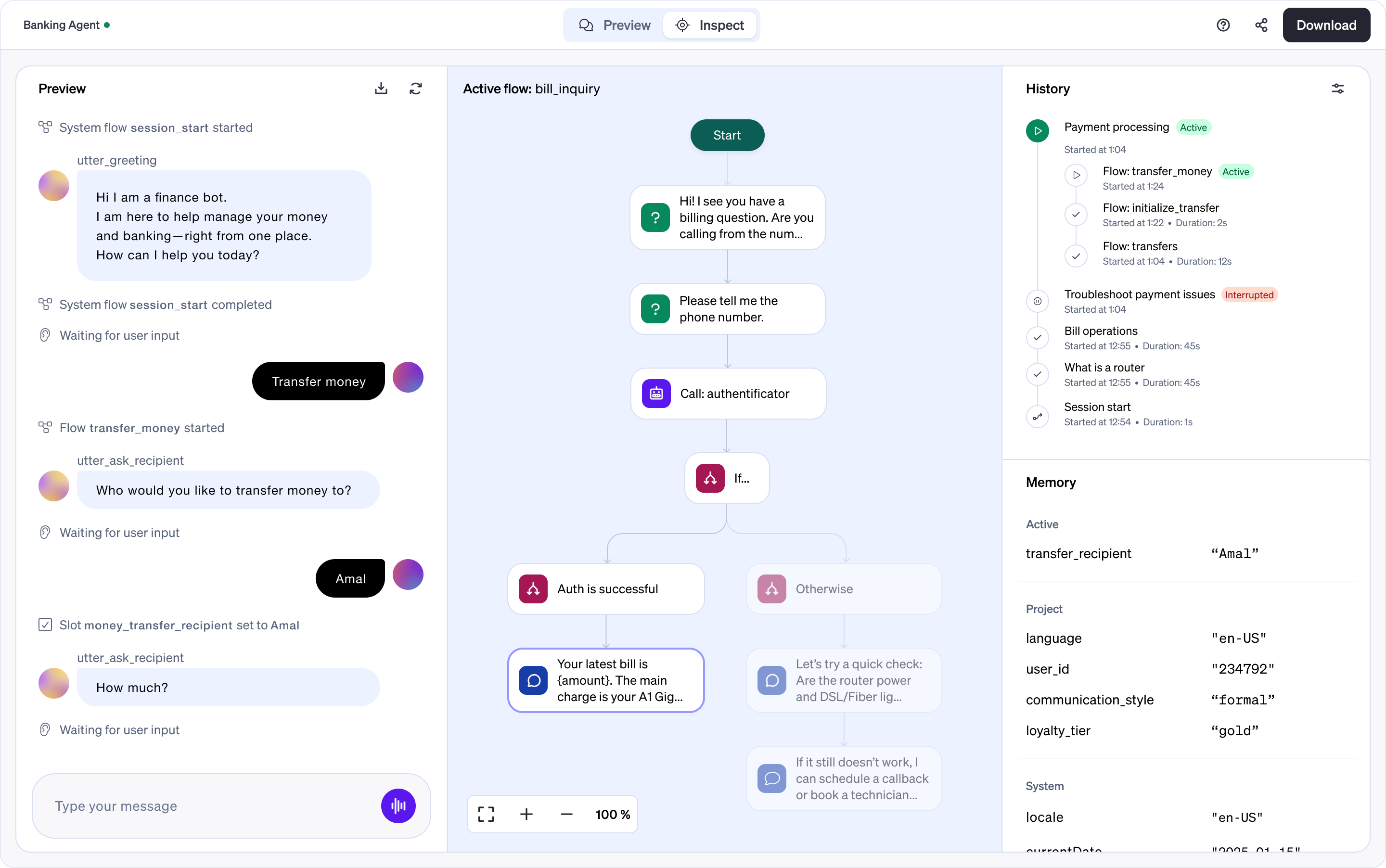
Rasa is a mature, self-hostable platform for production customer service agent deployment. The platform is built around three layers: an orchestration layer that decides what happens next, a skills system for composable, reusable capabilities (each skill knows what it needs, what it can do, when to escalate, and what success looks like), and a memory layer that maintains context across turns, sessions, and channels. Rasa Studio provides a browser-based environment for prototyping and refining agent behavior; developers extend backend logic, custom actions, and integrations where needed.
Rasa supports LLM-agnostic deployment: you choose the model, host it where your compliance requirements demand, and swap components without rewriting the whole agent. For teams in regulated industries where data sovereignty is a hard requirement, this architecture matters.
The Rasa Developer Edition is the starting point for teams evaluating the platform.
SaaS Chatbot Platforms
SaaS platforms trade control for speed. Zendesk AI, Intercom Fin, and Salesforce Einstein Bots are designed to work within their parent CRM/ticketing ecosystems. If you're already on those platforms and your use cases are relatively standard, they're worth evaluating seriously.
The limits become visible when you need custom integrations, multi-channel orchestration, on-premises deployment, or the ability to change how the AI model behaves at a fundamental level. Most SaaS platforms don't support those requirements.
Cloud Provider Solutions
AWS Lex, Google Dialogflow CX, and Azure Bot Service are managed AI services. They handle infrastructure, provide pre-built NLU pipelines, and integrate with their respective cloud ecosystems. If your organization is already deeply committed to one cloud provider and your support stack lives there, these reduce integration complexity.
The practical constraint: you're deploying on the cloud provider's infrastructure. For teams with data residency requirements or multi-cloud architectures, that's a limiting factor.
How Much Does a Customer Service Chatbot Cost?
There's no single answer, because "AI chatbot" covers everything from a widget on a landing page to a multi-channel enterprise agent with custom integrations and on-premises deployment. The cost range for AI customer service deployments is genuinely wide.
Rough framing: simple SaaS-based deployments for a single channel with standard integrations can run a few hundred to a few thousand dollars per month. Complex enterprise builds with custom NLU, multiple integrations, and dedicated infrastructure can run into six figures for initial development, with ongoing maintenance costs on top.
Build vs. Buy Considerations
Buy (SaaS) is faster to start and has a lower upfront cost. Total cost of ownership gets complicated when you factor in per-seat or per-conversation pricing at scale, plus the work of fitting your workflows into the vendor's model.
Building on a self-hostable platform has a higher upfront engineering investment, but you own the system. No per-conversation fees. No vendor dependency for how the AI behaves. Easier to evolve. For high-volume deployments and organizations with specific compliance requirements, the build path usually has better long-term economics.
The real question isn't "what does it cost to start?" It's "What does it cost to operate and improve over two years?"
Hidden Costs to Plan For
Conversation design work: often underestimated. Good conversation design is a skill. Budget time and people for it.
Training data creation and curation: You need real, varied examples. Sourcing them, cleaning them, and keeping them current is ongoing work.
Integration maintenance: APIs change. CRM schemas change. Ticketing platforms ship updates. The integrations you build today need to be maintained.
Retraining and iteration: a chatbot that isn't actively improved will degrade. Customer language changes. Policies change. Products change. Budget for regular improvement cycles.
Human review and QA: especially early in deployment, someone needs to review conversation logs, flag failure patterns, and feed them back into the training process.
Conclusion
A customer service chatbot earns its place in your stack when it gives customers their first meaningful action faster than the alternative, escalates cleanly when it should, and keeps getting better as you learn from production traffic. The teams that succeed treat it as an operating system for service work, not a one-time deployment.
That's the case for building on a platform you can own end-to-end. Rasa gives engineering and CX teams the orchestration layer that decides what happens next, the skills system that packages trusted capabilities into reusable units, and the memory layer that carries context across channels and sessions. You deploy where your security model requires, adapt the dialogue understanding to your own data, and evolve the agent without waiting for a vendor's roadmap.
Start with the Rasa Tutorial for a working customer service flow you can run locally in under an hour, or grab a free Developer Edition license and start building against your own integrations. When you're ready to talk through what an enterprise deployment looks like for your specific use cases, connect with the Rasa team.
FAQs
What is the best chatbot for customer service?
It depends on what "best" means for your situation. SaaS platforms like Zendesk AI and Intercom Fin are the fastest path to deployment if you're already in their ecosystems and don't need deep customization. For teams that need full control over their AI stack, on-premises deployment, or LLM flexibility, an open-source orchestration framework like Rasa is the stronger choice. The best chatbot is the one that fits your actual requirements, not the one with the best marketing.
Are chatbots legal?
Yes, chatbots are legal, but they operate within a growing set of disclosure requirements. California's BOT Disclosure Act (SB 1001), codified at Business and Professions Code Sections 17940 through 17943, requires that automated bots used to incentivize a sale or influence a vote disclose they are not human. The EU AI Act, which entered into force in August 2024, includes transparency obligations that require disclosure when AI is used in customer-facing interactions. GDPR applies to any conversation data you collect on EU residents, including chat logs. Check disclosure requirements in your operating jurisdictions before deploying. Don't design a bot that impersonates a human agent.
Can I build my own AI chatbot?
Yes. The tooling for building AI chatbots is mature and well-documented. The fastest hands-on starting point is the Rasa Tutorial, which walks through building a working customer service flow in about 30 minutes using the free Developer Edition. Beyond that first build, the technical work is real: you'll need to design conversations, build dialogue understanding and skill coverage, wire integrations, and run testing and deployment infrastructure. It's not a weekend project, but it's also not as opaque as it used to be.
How long does it take to build a customer service chatbot?
A focused build targeting two to three well-defined use cases can reach a deployable state in six to twelve weeks. Enterprise deployments with multiple integrations, custom NLU, and multi-channel support typically take three to six months for the initial production version. Neither of those timelines includes the ongoing iteration work that happens after launch. Plan for the bot to keep improving for at least six months post-deployment before you evaluate whether it's working.