Rasa and n8n both sit under the broader “agent platform” umbrella, yet they do very different jobs. n8n does workflow orchestration: setting up a chain of steps that a trigger sets off and that runs once, start to finish. Rasa, an AI agent-building platform, runs dialogue orchestration: a live, multi-turn conversation that a person steers. Many teams use both.
- Workflow orchestration (n8n): A setup where a trigger sets off a chain of pre-set steps, some of which may use an LLM, and the run goes once from start to finish.
- Dialogue orchestration (Rasa): The ability to handle multi-step open-ended conversations with a customer and guide them to a solution.
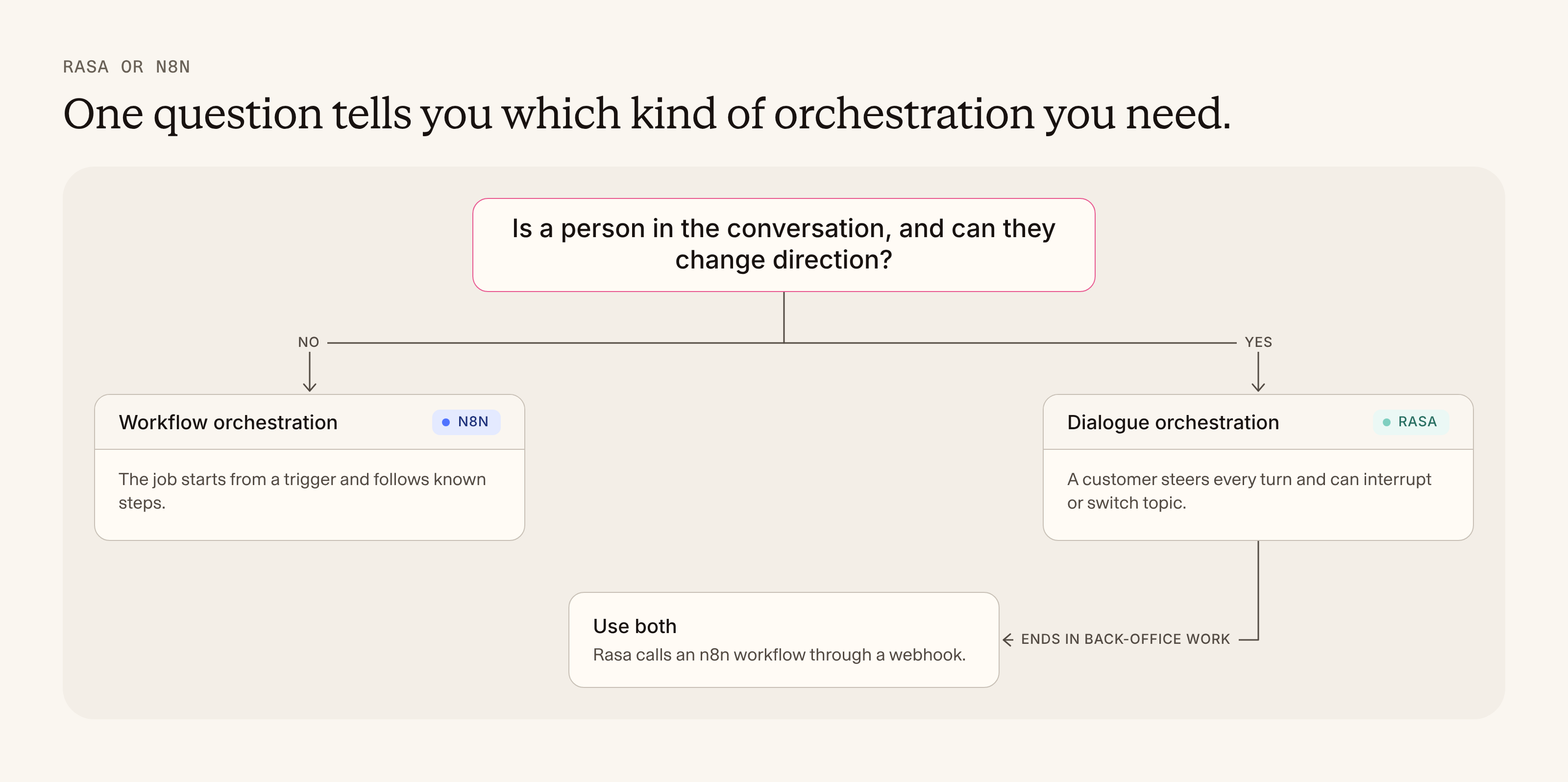
- The test: Is a conversation with a person required to complete a task, and can that person change direction? If yes, you need dialogue orchestration.
- Together: Sometimes you need both. Rasa handles the customer conversation, and a webhook hands the back-office work to n8n.
Every time a customer on a call asks, "Is Rasa like n8n?", I think the same thing: we need to clear this up once and for all. Honestly, it's a fair question.
Everyone in AI today uses the word "agents" for most anything driven by an LLM. The lack of differentiation in language between an agent that holds a conversation (what was once called conversational AI) and one that runs a workflow (what was once called workflow automation) makes life hard for anyone trying to learn or buy software.
In this article, I’ll clarify the difference, share examples of what each tool looks like when you build with it, and how you can use Rasa and n8n together.
What is the difference between Rasa and n8n, explained simply?
Think of a restaurant.
Rasa is the waiter. You order a burger. Then you ask what's in the soup. Then you change your mind and want the pasta, with no mushrooms. The waiter answers the soup question, remembers the pasta and the mushrooms, follows up about your missing drink preferences and allergy concerns, and still gets your order right.
n8n is the kitchen. An order ticket comes in and sets off a chain of stations: grill, assemble, plate, ring the bell. A station might use some judgment along the way, like a chef tasting the sauce, but the ticket runs from start to finish in one go. Nobody in the kitchen talks to you while it cooks.

A kitchen can't take your order, and a waiter doesn't cook your food. A good restaurant needs both.
What is workflow orchestration?
Workflow orchestration coordinates a chain of automated steps across systems. A trigger sets it off, and the run goes from start to finish in one go. Some steps may use an LLM to read, sort, or summarize, but no one is talking back while it runs. The next trigger starts a fresh run.
A good way to picture it is a chain reaction. The trigger tips the first domino, each step sets off the next, and some of those steps may be an LLM reading, sorting or writing something along the way. The run goes one way, once, until the last piece falls.
What does a workflow in n8n look like?
If you've built in n8n, this should look familiar: a trigger node on the left, and data moving right from node to node.
Route a new lead
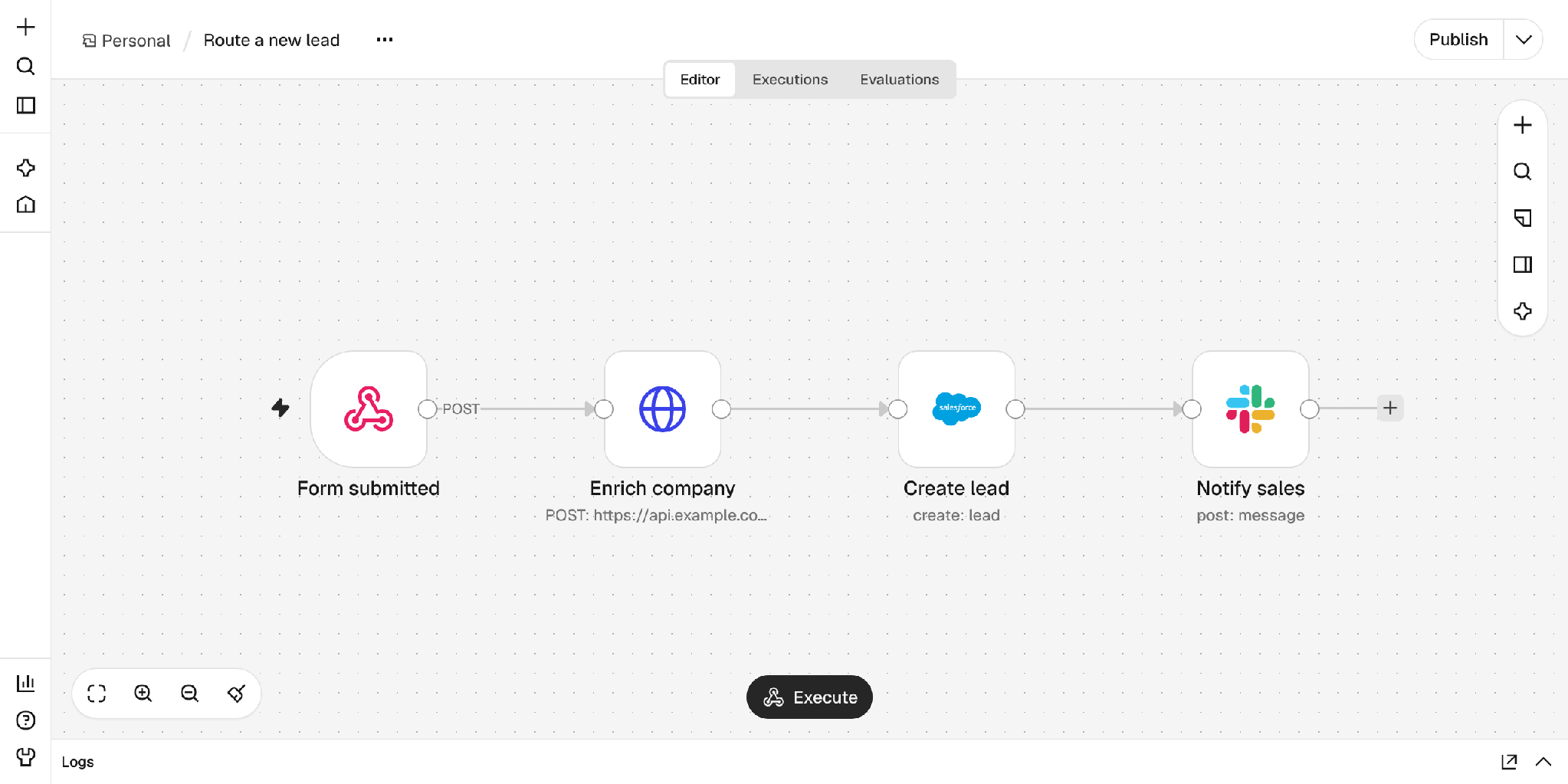
Steps: A Webhook node receives the form, an HTTP Request node enriches the company, a Salesforce node creates the lead, and a Slack node alerts the team.
Invoice matching
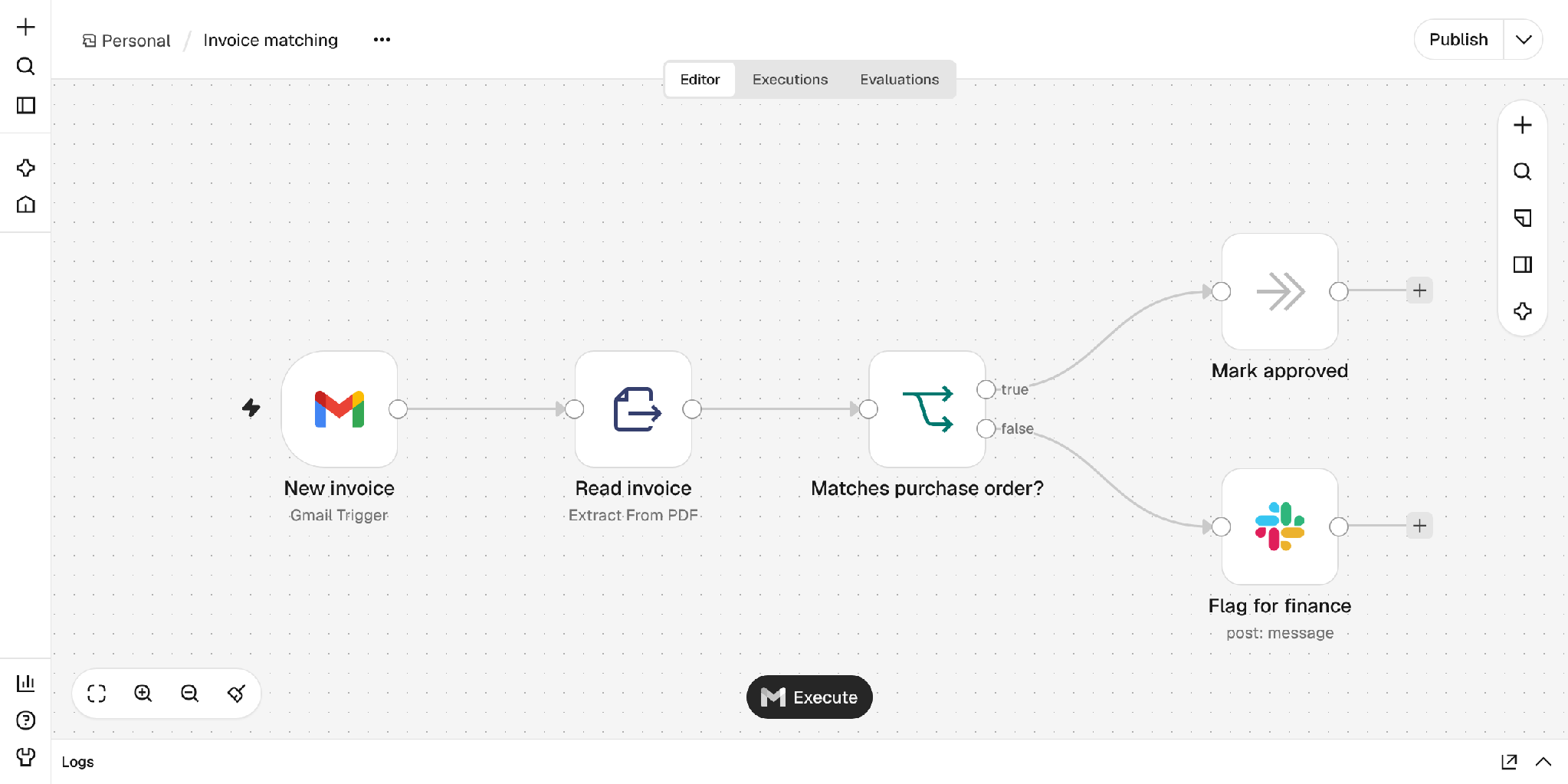
Steps: A Gmail Trigger picks up the invoice, Extract from File reads it, and an IF node will either approve it or flag it for finance in Slack.
Morning ticket digest, with an AI Agent node
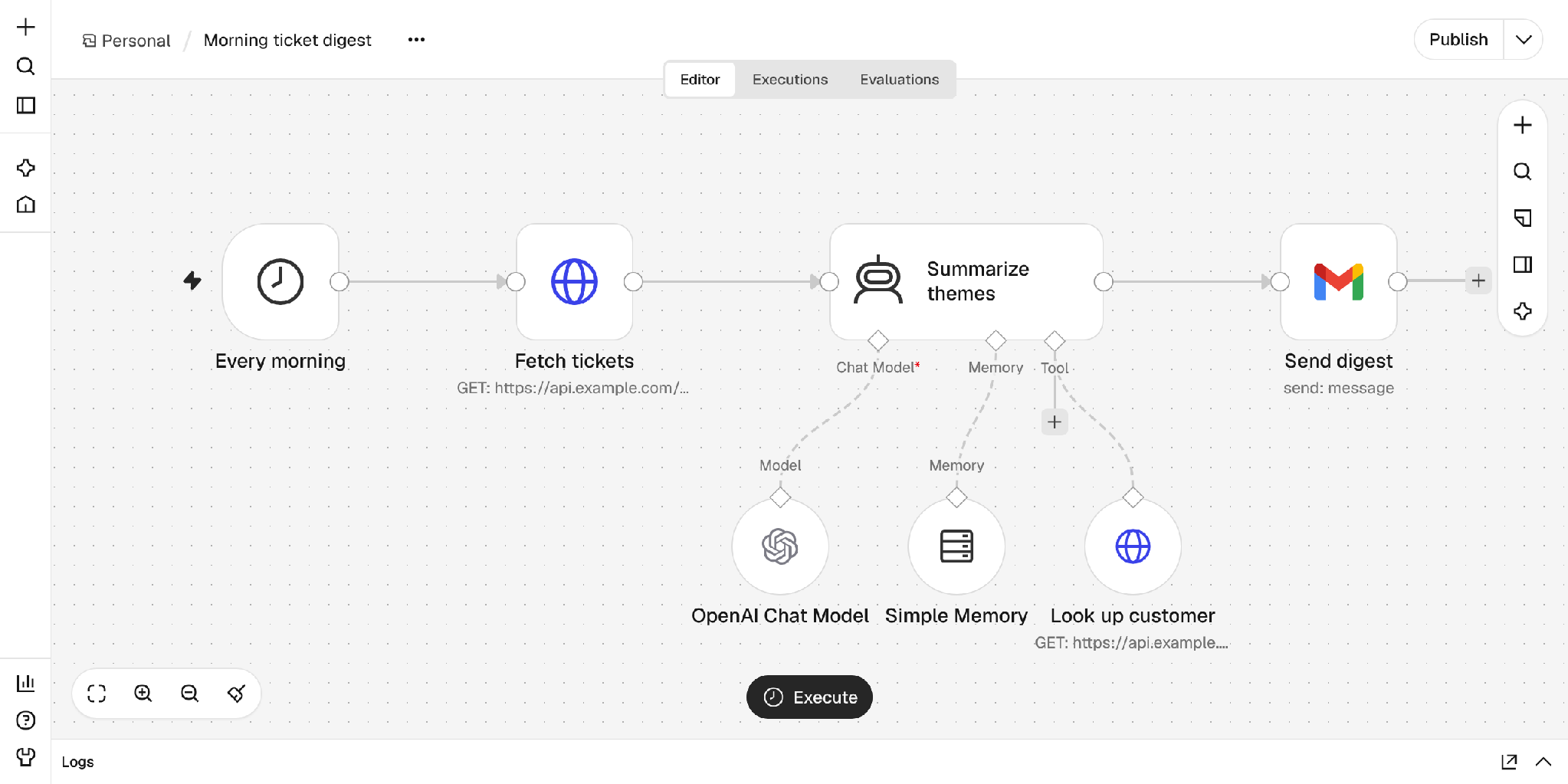
Steps: a Schedule Trigger runs each morning, an HTTP Request fetches tickets, an AI Agent node summarizes the themes, and Gmail sends the digest.
Does n8n have AI agents?
Yes. The AI Agent node is where n8n's agents live. You attach a chat model, optional memory, and tools to it, and the model decides which tools to call until the task is done. It's a great pattern for work like the digest example above, where there isn’t anyone waiting for a reply. The agent is one step inside a workflow: the trigger still starts it, and the workflow still decides what happens after it.
What is dialogue orchestration?
Dialogue orchestration manages a conversation as it unfolds, one turn at a time. It tracks which task is active, what we know about the customer, what the customer has already provided, and what to do when they digress to other topics or tackle two things at once. This is the core of an AI agent framework built for customer conversations.
What does dialogue orchestration in Rasa look like?
In Rasa, each job the agent can do is a skill: a folder with instructions in plain language, plus the tools, memory, and reference material that job needs.
reschedule_delivery/
├── skill.md         ← instructions, in plain language
├── memory.yml       ← what this skill tracks (new_date, order_id)
├── tools/
│   └── tools.py     ← Python functions the agent can call
└── references/
    └── faqs.md      ← delivery FAQs
Here is a customer rescheduling a sofa delivery, with what Rasa is doing on each turn:
How does Rasa handle a customer who changes the topic?
Active skills sit on a stack. When the customer changes topic, the new skill goes on top, and the paused skill keeps its place, including how far it got. When the new skill finishes, it pops off the stack and Rasa offers to resume the paused one. If the customer says no, the paused task is dropped. Rasa never silently jumps back into a half-finished task. That is why the orchestrator within Rasa is so powerful. After 10 years working in the business of making things talk, Rasa’s orchestrator really handles all the edge cases of natural language conversation.
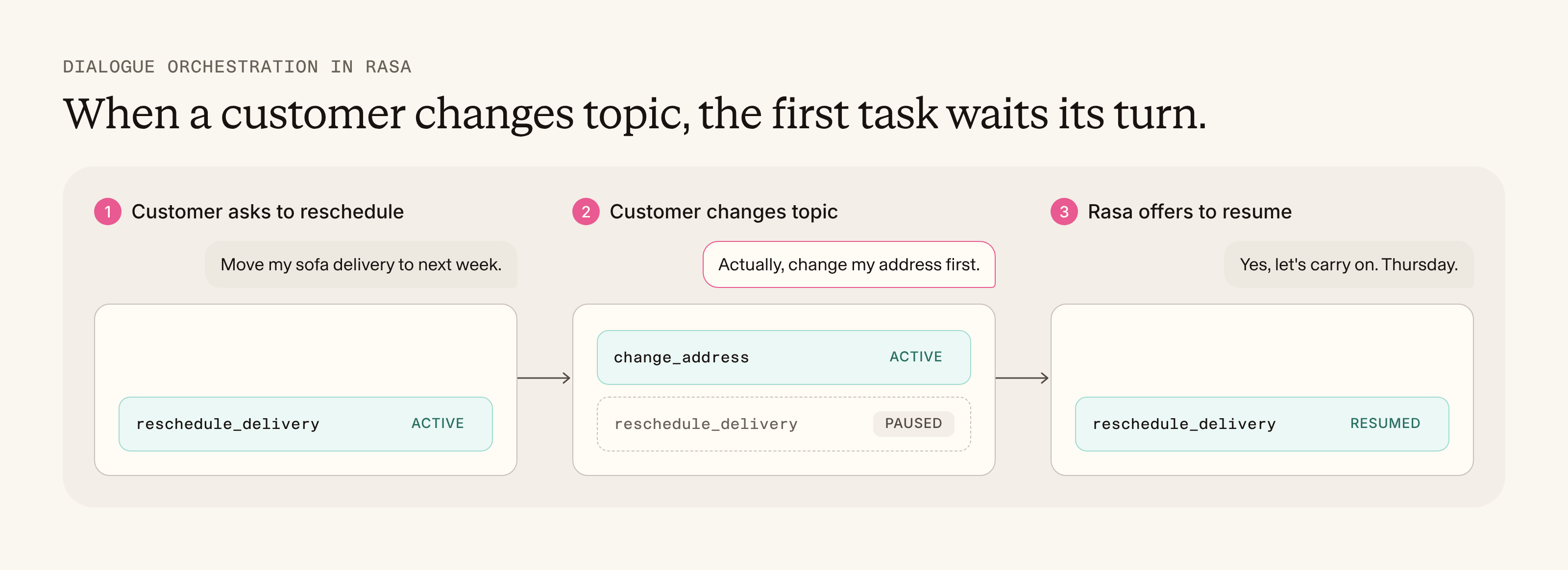
Every step is logged as an event, so you can watch it happen in the Inspector:
skill_activated     reschedule_delivery
skill_interrupted   reschedule_delivery
skill_activated     change_address
skill_completed     change_address
skill_resumed       reschedule_delivery
skill_completed     reschedule_delivery
Can you build a conversational agent in n8n?
Yes, and for simple cases it works well. The standard setup is a Chat Trigger connected to an AI Agent node with Simple Memory attached:
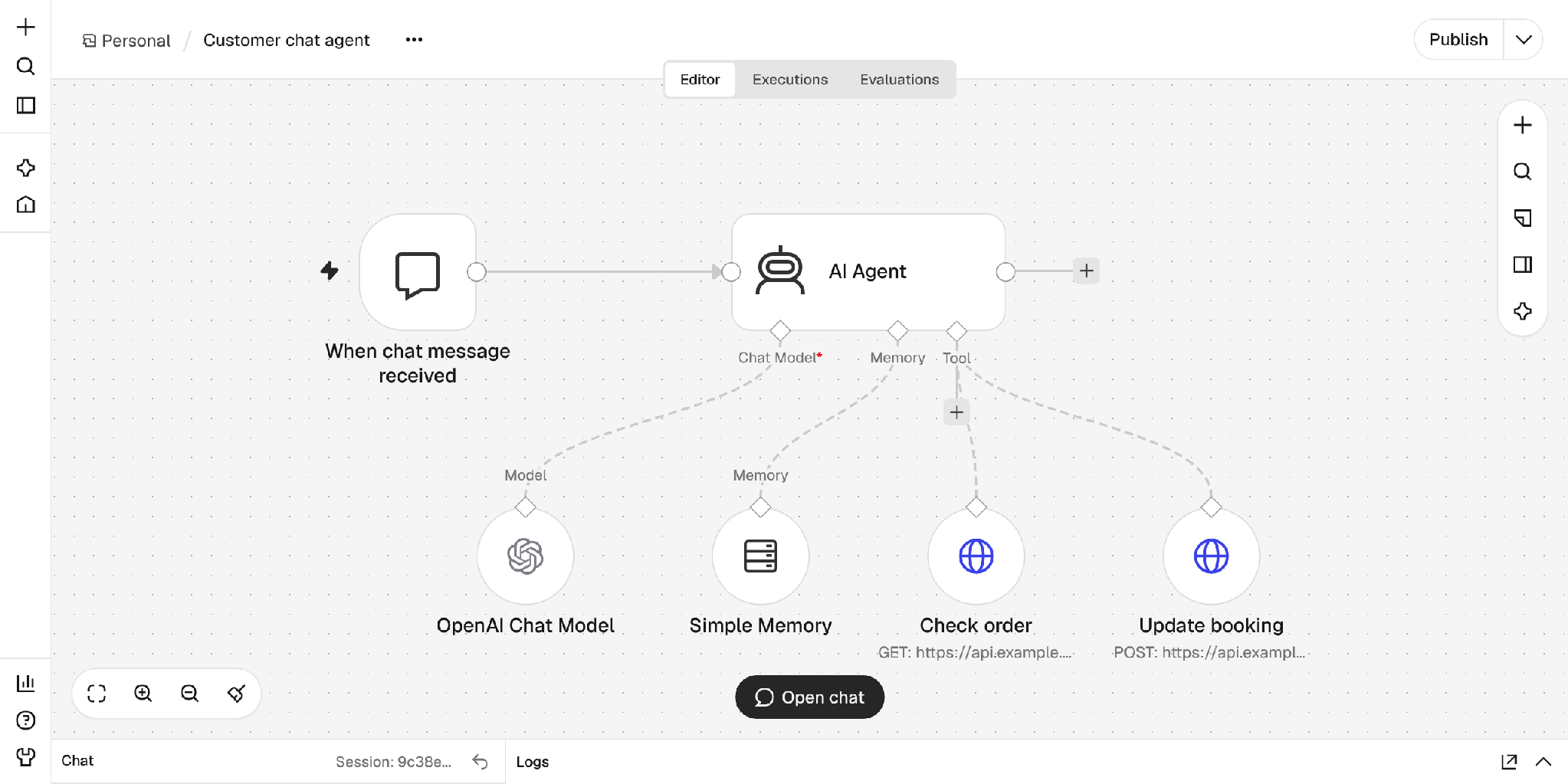
This gives you a question-and-answer agent that can call tools. Here is where it gets hard for customer-facing conversations:
- Memory is chat history. Simple Memory stores a set length of chat history for the current session. There is no declared record of "the customer picked Thursday" that the rest of the system can check.
- There are no paused tasks. Nothing tracks that a rescheduling was interrupted by an address change and still needs finishing.
- Tools aren't tied to conversation state. Every connected tool is available to the model on every turn. Hiding the refund tool until identity is verified means building that logic yourself with IF and Switch nodes.
- Approval is a review step, not a business rule. n8n can pause a tool call until a reviewer approves or denies it, in the chat or in a channel like Slack. That's useful for internal sign-off, but it's set per tool. It doesn't depend on what the customer has said or provided so far.
You can build all of this by hand in a workflow. An IF node for every topic change, a Switch for every correction, a branch for every task that might get paused. That's where good workflow automation turns into a Rube Goldberg machine, an elaborate chain of parts built to fake something simple for a person: a conversation that can change direction. At that point, you are building dialogue orchestration inside a tool designed for something else.
How does Rasa apply business rules in a conversation?
In Rasa, rules live in the skill itself. This skill is only offered once the customer is authenticated. Its update_delivery tool stays hidden from the model until a new date is set, and then it waits for the customer to confirm:
---
name: Reschedule Delivery
description: Move a scheduled delivery to a new date.
requires: "session.project.authenticated"

tool_constraints:
  - update_delivery:
      requires: "session.reschedule_delivery.new_date"
      requires_confirmation:
        enabled: true
---
The model can't call a tool it can't see, so the rule holds whichever route the conversation takes. If a condition can't be checked, the tool stays hidden. See how tool constraints work in the Rasa docs.
Dialogue orchestration vs. workflow orchestration: which one do you need?
The quick test:
- Is a conversation with a person necessary to complete the task? If no, it's a workflow. Use n8n.
- Can that person digress, go on a tangent, correct themselves, or ask something new? If yes, it's a dialogue. Use Rasa.
- Does the conversation end in work across several back-office systems? Then use both: Rasa for the conversation, n8n for the work behind it.
When should you use Rasa vs. n8n?
Use n8n when:
- The job starts from a specific event or a schedule
- The work can run from start to finish without any back-and-forth
- No one is waiting on the other end for a reply
Use an agent building platform like Rasa when:
- A customer is talking or typing to an agent
- They can interrupt, correct themselves, or change topic
- Business rules have to apply at specific points, whatever route the conversation takes
- The conversation happens over voice. Callers talk over the agent, go quiet, and wait while tools run. In Rasa, playback stops when the caller interrupts, the agent checks in after a silence timeout, and the model says a short acknowledgement before it calls a tool.
Use both when the customer conversation ends in back-office work that touches several systems.
How do Rasa and n8n work together?
The waiter hands the ticket to the kitchen. In practice, a Rasa tool is a Python function, and an n8n workflow can start from a Webhook node. Connecting them takes one HTTP call.
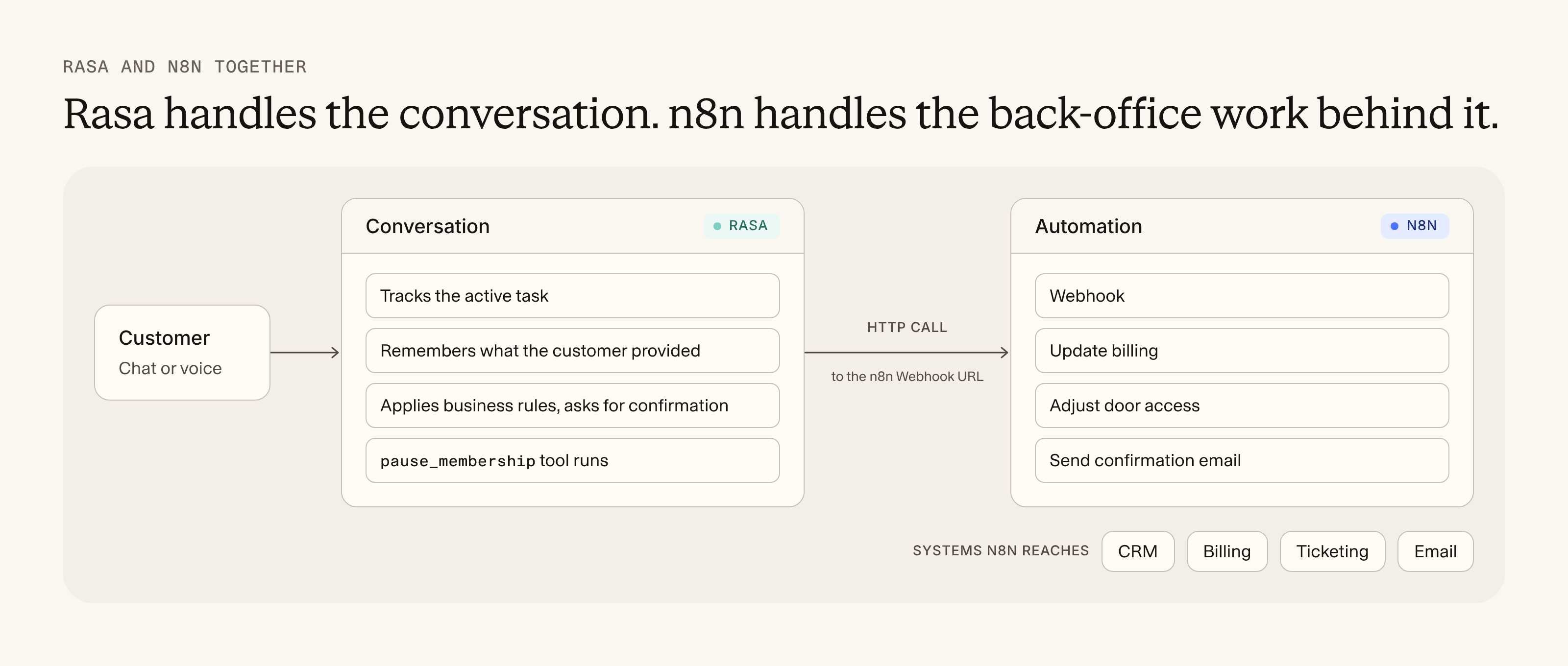
Example: a Rasa agent that triggers an n8n workflow
A gym member pauses their membership:
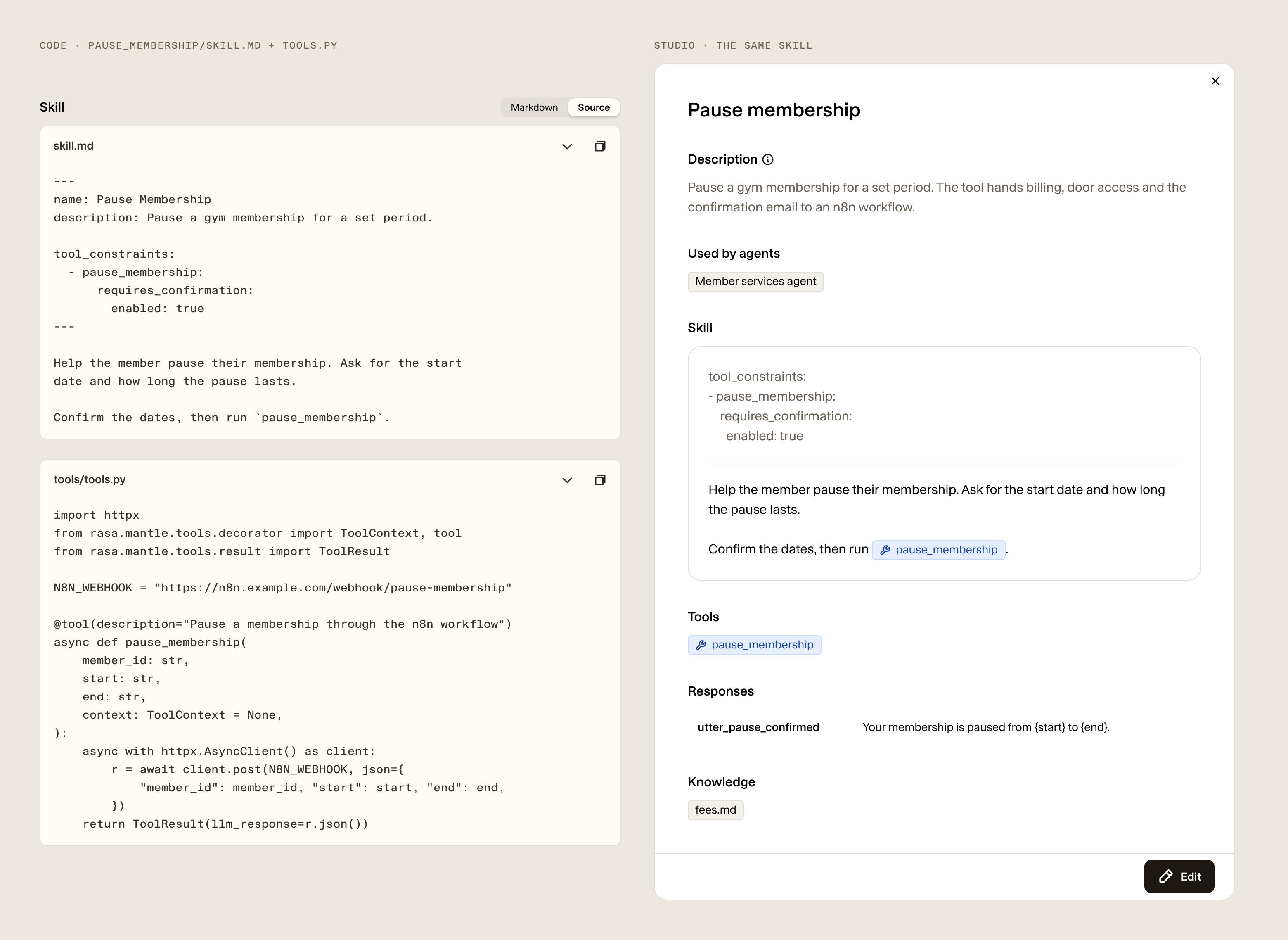
On "Yes," the skill's tool calls the n8n webhook, and the workflow does the rest:
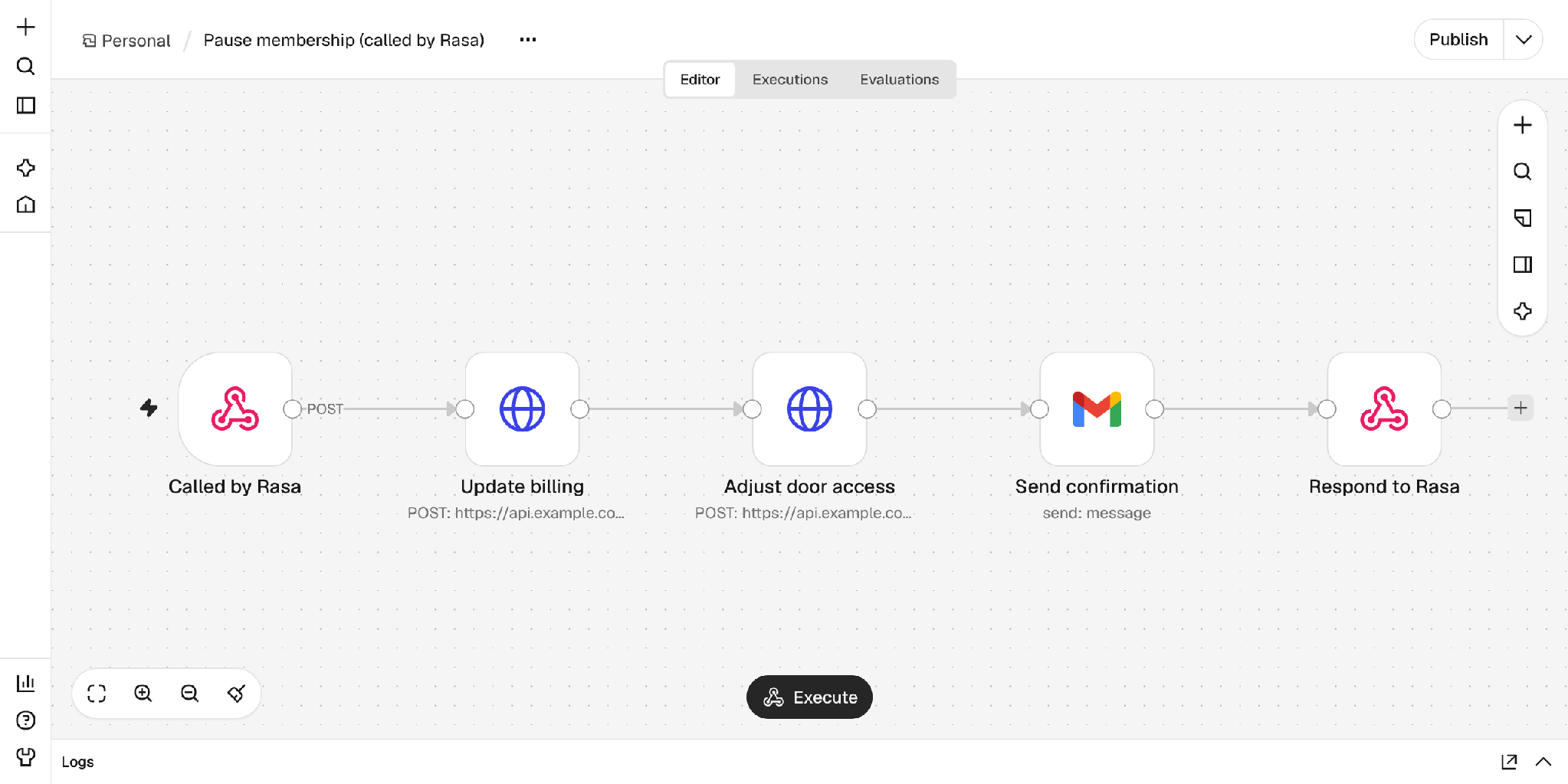
Steps: the Webhook node receives the call from Rasa, two HTTP Request nodes update billing and door access, Gmail sends a confirmation, and the Respond to Webhook node sends the result back to the tool, so the agent can tell the member it's done.
Example: an n8n workflow that leads into a Rasa conversation
It works in the other direction too. n8n catches a failed payment and messages the customer with a chat link. When they open it, the invoice details arrive as channel metadata, and Rasa fills them into memory at the start of the session. Nobody has to ask "which invoice?"
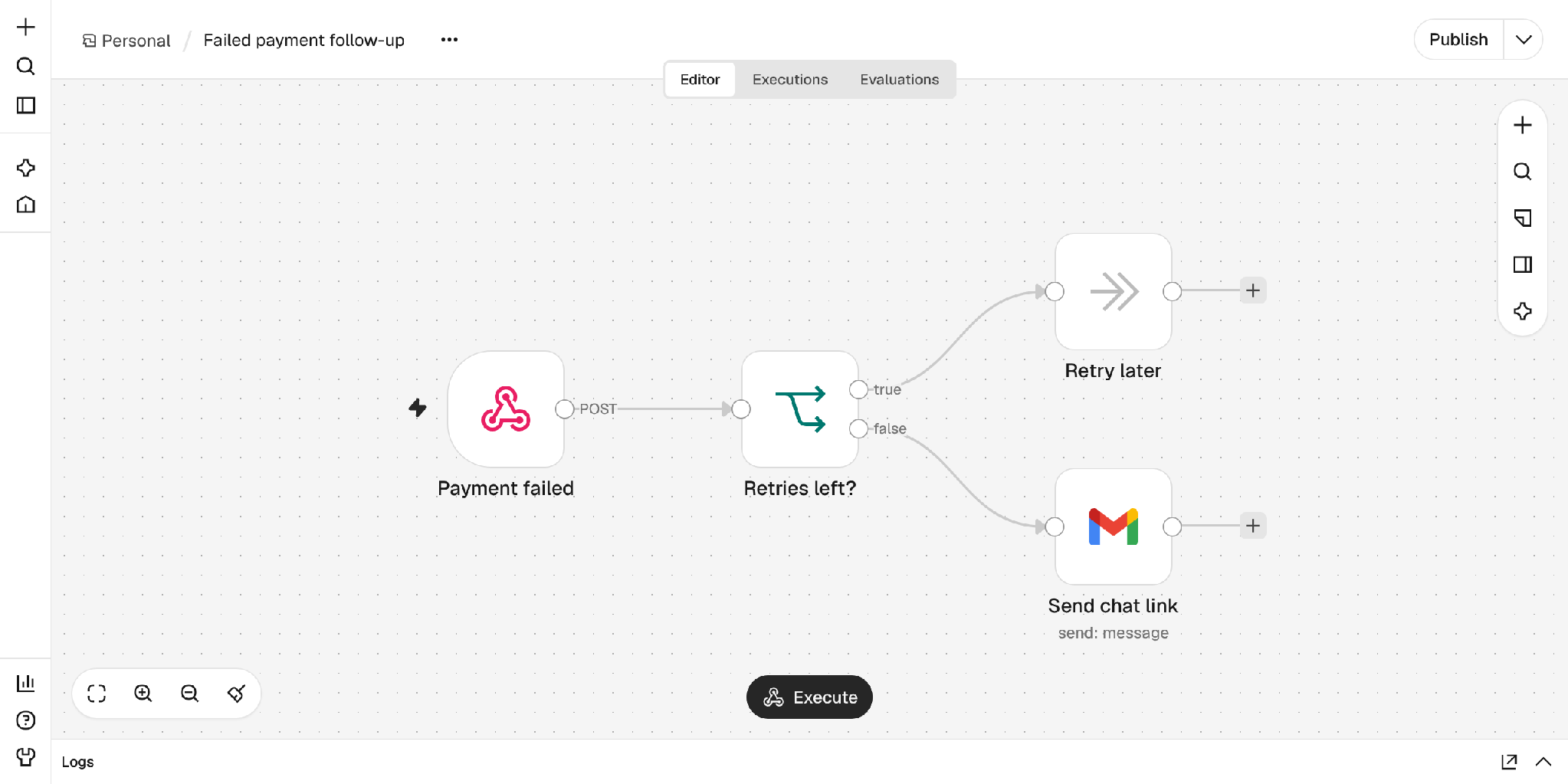
From there, the conversation can go anywhere: updating payment details, questioning the invoice, or switching plans.
FAQ: Rasa vs. n8n
Is Rasa like n8n?
No. n8n automates workflows between systems. Rasa is a platform for building AI agents that hold multi-turn conversations with people. They solve different problems and are often used together.
What is the difference between dialogue orchestration and workflow orchestration?
Workflow orchestration runs a chain of steps from a specific trigger to a finish in one go. Dialogue orchestration manages a live conversation, where a person decides what happens next on every turn.
Can n8n build a customer-facing AI agent?
For simple question-and-answer cases, yes, using a Chat Trigger and an AI Agent node. Once customers change topic, correct details, or pause one task to start another, that logic has to be built by hand in the workflow.
Can n8n remember a conversation?
Yes, within a session. Memory nodes like Simple Memory keep recent chat history for the AI Agent node. That is different from tracking which task is active and which values the customer has confirmed, which is what Rasa's skill memory does.
Is Rasa like Zapier or Make?
No. Zapier and Make, like n8n, are workflow automation tools: a trigger starts a set of steps across apps. Rasa manages customer conversations that change direction. The same pairing applies: Rasa runs the conversation, and a workflow tool can handle the back-office steps after it.
Does Rasa replace n8n?
No. Rasa connects to your systems through Python tools and MCP servers, and a Rasa tool can call any n8n workflow that starts from a Webhook node. Teams with many back-office automations often pair Rasa with a workflow platform like n8n.
Is Rasa open source?
Rasa Open Source is now a community-led project. Developers can use the Rasa platform for free through the Developer Edition.
The takeaway: Rasa and n8n solve different problems
If the work starts from a trigger and runs once to a finish, use a workflow tool like n8n. If a person is in the conversation and can change direction, use an agent-building platform like Rasa. Many teams need both, connected by a webhook.
Next step: Try Rasa for free with the Developer Edition, or read the Rasa docs to see how skills are built. For a wider view of the market, see our guide to the best AI agents for enterprise.